AI Demo Video Generator: The B2B SaaS Sales Team's Guide (2026)
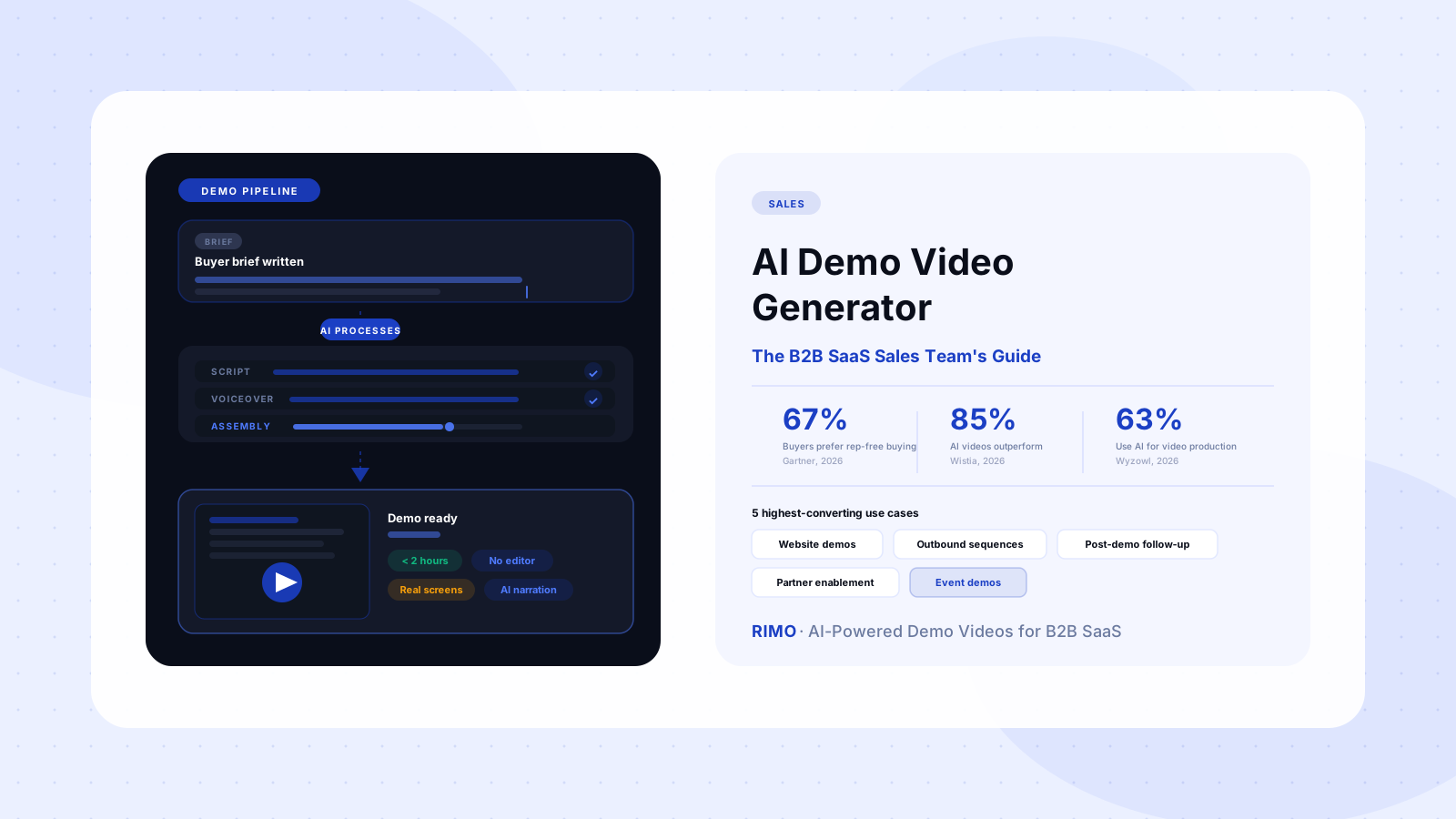
Sixty-seven percent of B2B buyers now prefer a rep-free buying experience, according to Gartner's 2026 sales survey. That number has climbed steadily every year for the last four years. It means that for the majority of your prospects, the first time they truly evaluate your product — forming a real opinion about whether it solves their problem — happens before a sales rep is ever involved.
That changes what a demo video does. It isn't supplemental content anymore. For a majority of your buyers, it's the demo.
An AI demo video generator is the tool that makes it possible to produce that demo at the scale and speed the rep-free buying shift demands. Not a Zoom recording. Not a polished agency production that takes six weeks and $12,000 and is already outdated by the time it ships. A purpose-built, screen-accurate, branded demo video — produced in under two hours from a plain-English buyer brief.
The problem is that "AI demo video generator" now gets applied to dozens of tools, most of which weren't designed for this specific job. This guide is for B2B SaaS sales and presales teams who need to know what actually works, what to avoid, and how to choose the right platform.
In this guide
- What is an AI demo video generator?
- Why the rep-free shift makes demo videos non-optional
- AI demo video generator vs. AI product video generator
- The 5 use cases where AI demo videos convert best
- Website self-serve demo
- Outbound sales sequences
- Post-demo follow-up
- Partner and channel enablement
- Conference and event demos
- What separates great AI demo video generators from average ones
- AI demo video generator vs. interactive demo tool
- How to create your first AI demo video in under two hours
- Common mistakes that kill demo video effectiveness
- FAQ
What is an AI demo video generator?
An AI demo video generator is a software platform that uses artificial intelligence to produce polished demo videos from a product brief, script, or screen recording — without requiring a dedicated video editor, a production agency, or a multi-week production timeline.
The "demo" qualifier matters. Not every product video is a demo video. A brand video tells your company story. An explainer video defines what your product does. A customer testimonial provides social proof. A demo video has one precise job: show a specific buyer how the product solves a problem they recognise — in enough concrete detail that they can move their evaluation forward.
AI demo video generators are built to make that specific type of video faster, cheaper, and scalable across the full buyer journey. The best platforms compress a workflow that used to take weeks into hours. Some get it down to under two hours for a polished first draft.
One thing worth stating directly before anything else: the most dangerous thing about a bad demo video isn't that it won't convert — it's that it will. A misleading or inaccurate demo that converts creates customers who churn when the product doesn't match what they were shown. Accuracy isn't a production quality standard; it's a business requirement.
Why the rep-free shift makes demo videos non-optional
The Gartner stat from the opening matters more than it might initially seem. Sixty-seven percent of B2B buyers preferring a rep-free experience doesn't mean they want less information. It means they want to get that information without a sales rep mediating it.
A demo video is the primary format for delivering product information without a rep in the room. It's asynchronous, self-paced, shareable across a buying committee, and available at any point in the evaluation — including 11 pm when a VP is doing their own research before greenlighting a trial.
What AI demo video generators unlock is the ability to create and maintain that content at the speed B2B SaaS companies actually ship. Before AI, the economics of demo video production made it impossible to keep pace:
- Traditional agency production: $5,000–$20,000 per video, four to six week timeline
- In-house screen recording + editing: two to three weeks of editorial time, still requires an editor
- Result: most SaaS teams have one or two demo videos that go stale the moment the next sprint ships
With AI demo video generators, the math changes entirely. A fresh demo for a new feature takes an afternoon. A persona-specific version for a new ICP takes a morning. The content library stays current rather than slowly becoming a liability.
G2 and Capterra reviews of leading demo video tools in 2025–2026 surface three pain points that collectively explain why teams are switching to AI-native platforms:
Recording failures at the worst possible moments. Loom's single most-cited G2 complaint — flagged in over 147 reviews — describes recording instability: "crashes all the time, lags horribly, lucky if I can get one video in before it stops working." Vidyard's Chrome extension generates a parallel stream of complaints: "crashes during recording, fails to capture audio, or produces corrupted files." These are structural failure modes, not edge cases.
Editing is paywalled or requires a separate professional. Most screen recording and AI video tools surface "AI editing" features only at their highest paid tiers. Teams on base plans find the editor nearly useless for polished demo output. Organisations that can't access those tiers end up waiting days for simple changes — which means demos go stale rather than get updated.
One video for every buyer, regardless of what they care about. The feedback is consistent across G2 reviews: "We send the same video to an enterprise IT director and a startup founder. They both see sections that have nothing to do with their actual problem." (G2, 2025). A demo that tries to serve every buyer serves none of them well.
AI demo video generator vs. AI product video generator
This distinction gets flattened constantly in vendor pitches, so it's worth being direct.
An AI product video generator covers the full range of video types a marketing team might need: explainer videos, feature launch content, brand campaigns, homepage hero videos, social clips. The output might be avatar-led, animation-based, or screen-driven. The audience might be buyers, existing users, investors, or the general public.
An AI demo video generator is scoped specifically to the sales evaluation use case. The output must always show the real product — not an approximation, not AI-rendered UI, not an avatar describing features while a generic dashboard floats behind them. Real screens, real workflows, real interactions. Because the buyer watching is evaluating whether the product actually does what the sales team claims.
That difference in scope changes which criteria matter when you're evaluating tools.
An AI product video generator can use AI-generated b-roll and animated callouts. An AI demo video generator cannot. An AI product video generator might serve a PMM on a two-week production timeline. An AI demo video generator needs to serve an AE who needs something by end of week. An AI product video generator might be updated quarterly. An AI demo video generator needs updating every time a UI changes, a feature ships, or a new persona requires a different story — in fast-moving SaaS, that's every few weeks.
A secondary distinction matters here: avatar-based tools like Synthesia or HeyGen are sometimes marketed as demo video generators. G2 reviews tell a clearer story. After 90 seconds of watching an AI avatar present a product, reviewers note "slightly robotic eye movements, unnatural pauses between sentences, and hand gestures that repeat" (G2, 2025). For internal training videos, this is acceptable. For external B2B prospects who are using production quality as a proxy for company maturity — it is a liability.
The 5 use cases where AI demo videos convert best
Not all use cases for AI demo video generators deliver the same return. Here's where the ROI is highest, in priority order.
1. Website self-serve demo
The demo video on your website is the highest-traffic piece of demo content you have. It plays before buyers book a call. It plays while they're deciding whether to book a call. It plays again after the discovery call, when a champion is briefing the VP of Engineering who wasn't on the meeting.
Most B2B SaaS websites serve every visitor with one generic product video. It's often six months old and shows a UI that has since changed. AI demo video generators let you keep this content current — updated in an afternoon when a feature ships, not six weeks later after an agency production cycle.
The counterintuitive observation: a shorter, focused demo outperforms a comprehensive one. A 90-second video that speaks directly to three specific buyer problems converts better than a three-minute tour of every feature. The goal isn't to show everything. It's to make the buyer feel understood.
2. Outbound sales sequences
A personalised video in a cold outreach email consistently outperforms plain text. The friction has always been scale. One custom video per prospect isn't operationally feasible. One generic video for all prospects destroys the personalisation premise.
AI demo video generators with persona templates resolve this: define five or six buyer archetypes (startup CTO, enterprise IT director, mid-market PMM), build archetype-specific demo videos once, and route the right version to each prospect automatically. The output feels personalised. The production effort is centralised.
3. Post-demo follow-up
This is the most underused use case — and frequently the highest-converting one.
After a live product demo, the buying committee has a structural problem: the stakeholders who weren't on the call can't get the experience second-hand. A written summary doesn't convey what they need to see. A Zoom recording is too long, too informal, and requires a login.
A follow-up demo video that highlights the three workflows most relevant to that specific buyer's pain points — produced within an hour after the call — gives champions something professional to share internally. It extends the live demo into the rest of the buying committee without requiring another hour of AE time.
4. Partner and channel enablement
Partners and resellers need to demo your product without being product experts. A library of accurate, up-to-date demo videos gives them something reliable to reference or share in their own sales cycles — instead of ad-hoc screen shares that may misrepresent your product.
The alternative — periodic training sessions and slide decks — goes stale the moment a UI update ships. AI demo video generators make it possible to maintain a partner demo library that can be regenerated when the product changes, without requiring your team to re-run every partner training programme.
5. Conference and event demos
Trade show booth demos, webinar openers, and event presentations all benefit from a polished video loop that demonstrates the product without requiring a live presenter at every moment. AI-generated demos let teams produce event-specific versions — showing the industry-relevant use case, not the generic product tour — without commissioning a new production for each conference.
Build your first AI demo video today
Rimo generates screen-accurate, branded demo videos from a plain-English buyer brief. No video editor, no agency, no six-week wait. The average Rimo demo is ready in under two hours.
What separates great AI demo video generators from average ones
Most feature comparison lists for AI demo video generators focus on voiceover quality when using a video maker with voice over, export formats, and caption accuracy. Those matter, but they're table stakes for any tool worth evaluating. For sales and presales teams, five criteria determine whether a platform delivers in practice.
Real product screens — not generated visuals
This is non-negotiable, and it's the first thing to test. If a tool uses AI-generated UI imagery, generic placeholders, or stock b-roll where your product should appear, it is not a demo video generator — it is a presentation builder. Run your actual product screens through every shortlisted tool before any other evaluation step. If the output doesn't show your real product, eliminate the tool.
Update speed when the product changes
This is the operational question most teams don't ask during evaluation, and it's the one that determines long-term viability. Ask every vendor directly: "If I need to swap three screens in an existing demo video, how long does that take and what's the exact workflow?"
The answer reveals more about the platform's architecture than any feature spec. The best platforms treat a screen update as a minor operation — swap the asset, re-render, publish. The weaker ones require a full re-record. Over 12 months of product updates, the difference compounds into dozens of hours of extra work.
Persona-specific output from a single source brief
A tool that produces one universal demo is substantially less valuable than one that produces five persona-specific versions from the same source material. Your enterprise IT director needs to see compliance and security workflows. Your startup founder needs the three-click setup. Your mid-market PMM needs the reporting and export features.
If the tool can't generate variants efficiently, your team will create them manually — which defeats the purpose. Ask specifically: how does the platform handle persona segmentation, and how many variants can be generated from a single base script?
AI voiceover quality on your specific content
AI narration has improved dramatically. In 2026, most buyers cannot distinguish high-quality AI-generated narration from a professional human recording in a well-produced demo. But "high quality" varies significantly by tool — and especially by how each tool handles your product name, technical terminology, and natural pacing.
Run your actual script through any shortlisted tool and listen specifically for three things: correct pronunciation of your product name and feature names, handling of technical terms, and natural pausing at commas and periods rather than robotic cadence.
Brand consistency across all output
Every demo video your team produces should look like it came from the same company, whether produced by the AE or the PMM. Evaluate: can you configure brand colours, fonts, logo placement, and intro/outro templates globally, so that every video auto-applies them without per-video manual configuration? If the answer requires manual re-application each time, the tool will produce inconsistent output at scale.
AI demo video generator vs. interactive demo tool
This question is the most frequent debate in presales teams right now, and the framing is usually wrong. It's not a competition. It's a sequencing decision.
An AI demo video generator produces a video — a passive, watchable asset. The viewer watches without interacting. The benefit: embeddable anywhere, shareable in any context (email, social, website, CRM), viewable on any device, zero setup required on the viewer's end.
An interactive demo tool (Storylane, Arcade, Navattic, Walnut, and similar platforms) produces a clickable product simulation. The viewer can navigate, click through workflows, and explore at their own pace. The tradeoff: more production effort, some sharing friction (links that require iframes or logins), and weaker performance with passive audiences who aren't yet motivated to click through.
Here's the finding that most interactive demo vendors won't put in their own marketing: video converts better than interactive demos at the top of the funnel. A buyer who hasn't yet decided they care about your product won't sit through a guided click-through experience. They'll watch a two-minute video if the problem framing is right. The motivation to self-explore comes later, after the value case is established.
The product demo video vs. interactive product tour question, properly framed, is a sequencing question: use AI demo videos to create the initial belief in the value case, then use interactive demos to support self-directed deep evaluation. Most high-performing sales teams are starting to run both.
| AI Demo Video | Interactive Demo | |
|---|---|---|
| Shareable via email without friction | ✓ | Partial |
| Works on any device | ✓ | Partial |
| Update cycle when product changes | Hours | Days to weeks |
| Buyer can self-explore freely | ✗ | ✓ |
| Shows real product screens | ✓ (right tool only) | ✓ |
| Production time | 1–2 hours | Days |
| Best funnel position | Top of funnel | Mid-funnel evaluation |
How to create your first AI demo video in under two hours
Starting from zero, here's the practical production sequence.
Step 1: Write the buyer brief — not the feature brief
Most first demo videos fail at this step. Teams start by listing features instead of naming problems. A buyer brief answers four questions: Who is this video specifically for? What problem do they have that the product solves? Which three workflows in the product demonstrate that solution? What should the buyer believe or be able to do after watching?
The brief doesn't need to be long. Two to three paragraphs is sufficient input for most AI demo video generators to generate a structured script. The AI handles the structure; you provide the strategic direction.
The real production bottleneck isn't video editing — AI has reduced that to near zero. The brief is still a human decision. A clear brief produces a sharp demo. A vague brief produces a generic one.
Step 2: Capture clean product screens
Record or screenshot the exact workflows your brief describes. Use a clean demo environment with no personal data visible, no internal notifications, no test data that would confuse a prospect. The quality of your source footage determines the quality of every stage after — no AI tool can manufacture credibility from a cluttered screen recording.
Step 3: Generate, review, and refine
Upload your brief and footage to your AI demo video generator. Review the output specifically for: accuracy (right screens in right order), narration quality (correct product names and terminology), and brand consistency. Most platforms let you adjust voiceover pacing, swap individual screens, and edit narration copy without starting over.
Step 4: Publish with tracking from day one
A demo video with no analytics is a black box. Set up a dedicated hosting page for each demo video and track at minimum: view-through rate, average watch time, and time-to-next-action after a view. These metrics tell you whether the demo is earning attention, which sections lose viewers, and which buyer personas need a different angle. Demo video ROI attribution should be configured before the first video goes live — not retrofitted after you've produced twenty.
Common mistakes that kill demo video effectiveness
These errors consistently undermine what should be strong demo content.
Showing the whole product. Most first demo videos try to cover every feature. Buyers don't need to see everything — they need to see that you understand their specific problem. A 90-second video covering three relevant workflows converts better than a five-minute tour of the full platform. Show less, mean more.
Opening with your product name. Starting a demo video with "Welcome to [Product], the all-in-one platform for..." is equivalent to opening a sales email with "I hope this finds you well." The first 15 seconds should name the buyer's problem — not introduce your brand. Earn attention before you request it.
Ignoring the update lifecycle. Producing a great demo video is the beginning of the asset's life, not the end. Build your workflow around the assumption that it will need updating every four to eight weeks as your product evolves. If updating is painful, you'll let videos go stale rather than fix them. The asset becomes a liability.
Skipping the voiceover review. AI narration requires review before publishing — not a visual review, an audio review. Run the voiceover out loud before any demo goes live. You'll catch mispronunciations of your product name or technical terminology that a visual skim would miss entirely. These errors undermine credibility at exactly the wrong moment.
FAQ
What is an AI demo video generator?
An AI demo video generator is a software platform that uses artificial intelligence to produce polished demo videos from a product brief, script, or screen recording. It compresses a production workflow that would otherwise take days or weeks into hours — handling narration generation, scene assembly, captions, transitions, and branded output automatically. Unlike screen recorders, which capture raw footage, AI demo video generators produce a finished, shareable asset without requiring a human editor.
How is an AI demo video generator different from a screen recorder?
A screen recorder captures raw footage. An AI demo video generator turns that footage into a finished, watchable demo video. The difference is everything in between: script generation, AI voiceover, scene sequencing, transitions, captions, and brand application. Screen recording tools require a human editor to handle all of that work after the recording is done. AI demo video generators automate or eliminate those post-production steps.
Can AI demo video generators personalise videos for different buyer personas?
The best platforms in this category support persona-specific output — generating different demo versions for different buyer types (enterprise IT director, startup founder, mid-market PMM) from a shared source script or brief. This typically works by defining audience templates and generating variants from a common base. Not all tools support this capability; it's worth asking specifically during vendor evaluation, along with how many variants can be produced from a single base video and what the per-variant production time looks like.
How much does an AI demo video generator cost?
Pricing varies significantly by tier and use case. Free tiers exist on several platforms but typically cap output quality and branding. Paid plans range from around $50–$200 per month for individual users to $500–$3,000 per month for team plans with enterprise features, multi-user access, and custom branding. The relevant comparison isn't tool cost versus tool cost — it's AI tool cost versus the fully-loaded cost of traditional demo video production, which typically runs $5,000–$20,000 per video with a four-to-six-week timeline and no easy update mechanism.
Should I use an AI demo video generator or an interactive demo tool?
Both — for different stages of the buying journey. AI demo videos perform best at the top of the funnel, where buyers are still deciding whether your product is worth their attention. They're passive, shareable, and don't require buyer motivation to work. Interactive demo tools (Arcade, Storylane, Navattic) perform better mid-funnel, when buyers are actively evaluating and want to self-explore the product at their own pace. The video vs. interactive demo debate is really a sequencing question — most effective sales motions use both in sequence.
Which AI demo video generator is best for B2B SaaS sales teams?
The right platform depends on your team's specific priorities. For B2B SaaS teams that need real product screens, fast update cycles, persona-specific output, and professional polish without a video editor, Rimo is purpose-built for that use case — starting from a plain-English buyer brief and producing a finished demo video with AI narration and screen-accurate content in under two hours. If you're building a product demo video library at scale, Rimo's brief-to-demo workflow keeps your content current as your product evolves.
Akshay Sharma
Product Leader · 10+ years in B2B SaaS
Akshay has spent 10+ years building and marketing B2B SaaS products. He writes about product storytelling, demo production, and the operational side of product marketing.