What Is an AI Product Video Generator — and Why Most Won't Work for Product Demos
Your product shipped a new workflow last week. The demo video on your website still shows the old one. The PMM who built it is three sprints deep in a launch. The freelance editor who cut the last version isn't available for two weeks. So the outdated video stays live — and somewhere, a buyer watches it, sees a UI that no longer exists, and quietly closes the tab.
This is the problem an AI product video generator should solve. Not "make video easier" in the abstract — but specifically: let B2B SaaS marketing teams produce accurate, branded, current demo videos at the pace their product actually ships.
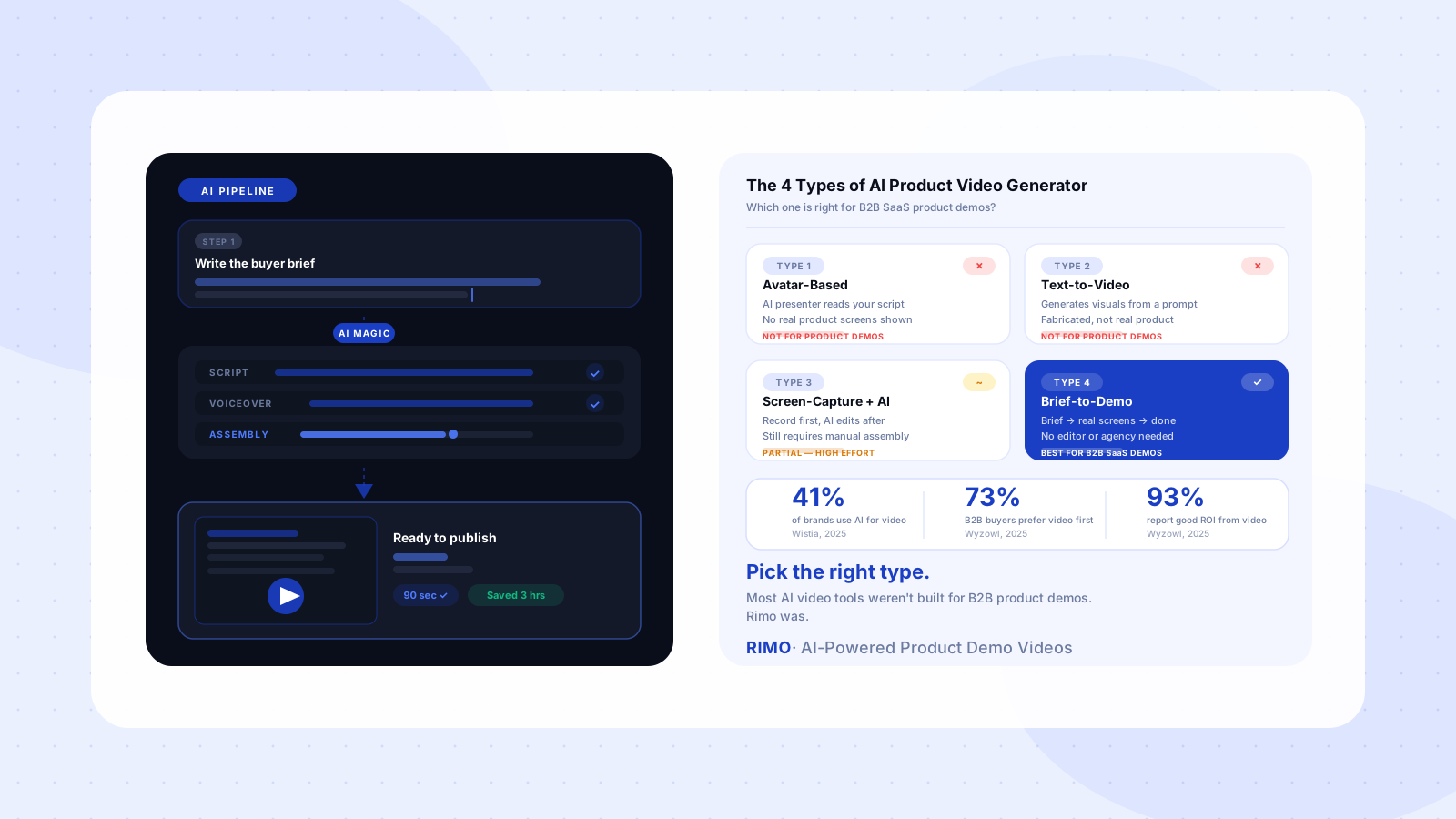
The problem is that "AI product video generator" has become a catch-all label for four fundamentally different tool types. Avatar platforms, text-to-video models, screen recorders with AI editing, and purpose-built demo production platforms all use this phrase. They solve different problems, serve different use cases, and produce very different results when a B2B SaaS team tries to use one to show a real product to a real buyer. This guide maps out all four, explains what each type is actually good for, and gives you a framework for choosing the right one.
In this guide
- What is an AI product video generator?
- The 4 types of AI product video generator
- Why most AI product video generators fail B2B SaaS teams
- How to evaluate an AI product video generator for B2B SaaS
- AI product video generator vs. traditional demo video production
- How to get started with an AI product video maker
- FAQ
What is an AI product video generator?
An AI product video generator is a software platform that uses artificial intelligence to automate some or all of the video production steps involved in creating product demonstrations and marketing content. Instead of the traditional sequence — brief, script, record, edit, export — AI product video generators compress or replace individual steps using AI-generated voiceover, automated scene assembly, template-based production, or some combination of all three.
The term covers a wide range of tools with genuinely different underlying approaches. A platform that converts a text prompt into an animated explainer video and a platform that takes real product screen recordings and auto-edits them into branded demos are both marketed as "AI product video generators." They are not the same tool. They are not right for the same use case.
For B2B SaaS marketing teams, this distinction is what matters most. What B2B buyers look for in a product demo video is credibility — buyers need to believe they are seeing how the real product actually works. The type of AI generator you choose determines whether the output earns or undermines that credibility.
According to Wistia's 2025 State of Video report, AI use in video production more than doubled in a single year — from 18% of companies in 2024 to 41% in 2025. That adoption growth didn't come from hype. It came from tools reaching a level of output quality that production teams could actually ship without embarrassment.
The 4 types of AI product video generator
Most comparisons of AI video tools treat all generators as interchangeable. They are not. The four categories below represent fundamentally different production approaches — and only one of them is built for the specific requirements of a B2B SaaS product demo.
Type 1: Avatar-based generators
Avatar-based generators (Synthesia, HeyGen, and similar platforms) create videos where an AI presenter reads a script you provide. You choose from a library of AI avatars, write or upload a script, and the tool renders a video with the avatar delivering your content in your chosen language.
These tools produce consistently polished-looking output. They are genuinely useful for onboarding materials, internal training videos, and international content where you need the same script delivered in 30 languages without re-recording. G2 reviewers rate them well for those specific scenarios.
For product demo videos, avatar-based generators have a structural limitation that no feature update can fix: they cannot show your product. The avatar can describe your features. The screen behind them is either blank, generic, or a static image you manually upload. That is not a product demo — it is a scripted presentation about a product.
G2 and Capterra reviews from 2025–2026 repeatedly flag this gap: "generated visuals were completely mismatched to the content" and "systems did not reliably use uploaded assets" (G2, 2025–2026). These complaints point at the category's core constraint, not individual product failures.
Type 2: Text-to-video generators
Text-to-video generators (Runway, Pika, Sora, and similar models) generate video footage from a written prompt. You describe a scene; the AI synthesises it from scratch.
The technical achievement here is real. The use case for B2B SaaS product demos is not.
Product demo videos must show the actual product — not a visually compelling approximation of what the product might look like. A buyer who watches a generated video depicting your dashboard and then opens the trial expecting that experience will be confused at best, and sceptical about your brand at worst. At the evaluation stage of a SaaS purchase, fabricated product screens are a credibility liability.
Text-to-video tools belong in brand campaigns, social content, and creative contexts where generated imagery is appropriate and clearly framed as such. Using them to represent real software interfaces inverts the purpose of the format entirely.
Type 3: Screen-capture tools with AI editing features
This category includes tools like Loom (with AI features), Descript, Camtasia, and others that layered AI capabilities onto an existing screen recording and editing product. The core workflow: record the screen, then use AI to assist with post-production — transcript-based editing, filler word removal, auto-captioning, automatic chapter generation.
These tools represent a genuine improvement over raw screen recording workflows. The AI features save measurable time in editing. For async communication and lightweight documentation, they work well.
For B2B SaaS product marketing at any meaningful scale, the limitations appear quickly. Loom's single most-mentioned G2 complaint — present in over 147 reviews — is recording reliability: frozen recordings, failed uploads, and audio sync failures at exactly the moments a production team cannot afford them (G2, 2025–2026). The tools were built for one-to-one async messaging, and they carry that design's assumptions into use cases that require different reliability guarantees.
Pricing structure is the other constraint. Teams on free tiers hit capability ceilings quickly. Vidyard's Plus plan — the tier where most marketing-grade features live — starts at $59 per user per month, which puts a five-person team at over $3,500 per year before accounting for the manual editing work the AI features don't eliminate.
Type 4: Brief-to-demo platforms
The fourth category is the newest and most directly relevant to B2B SaaS product marketing. Brief-to-demo platforms start from a plain-English description of the buyer's problem and the product workflow that solves it — and produce a finished, branded product demo video using real product screens.
Instead of starting with footage and editing it, these platforms start with the story and structure the production around it. They generate a scene plan from the brief, guide or handle the screen capture with that structure in mind, and then use AI to handle voiceover generation, transitions, captions, and final assembly.
This is what AI-powered demo video creation looks like at its most complete: the AI handles the production pipeline; the marketer handles the strategy. The brief is the creative input. The tool is the output machine.
For teams that need to produce demo videos at launch cadence — without a video team, without a six-week production cycle — this is the category worth evaluating.
Why most AI product video generators fail B2B SaaS teams
The gap between "AI video tool" and "AI video tool that works for B2B SaaS product marketing" is specific and consistent. G2 reviews across the most widely used platforms reveal five pain points that appear across tools, not just in individual products.
The product never actually appears. Avatar-based and text-to-video tools produce videos that look professional but show a fabricated representation of a product interface, not the real one. Buyers at the evaluation stage notice this. A demo that shows a mockup trains buyers to lower their trust in the vendor before they've even opened a trial.
Recording infrastructure breaks under production load. Screen-capture tools were designed for casual async messaging. When a product marketing team runs repeated recording sessions against a controlled demo environment, the reliability assumptions built for individual users become production bottlenecks. One hundred and forty-seven G2 reviews mentioning recording failures for a single tool is not a rounding error — it is a category pattern (G2, 2025–2026).
AI output ignores brand guidelines. Multiple Capterra reviewers noted that "the system did not follow the structure provided" and output "visuals completely mismatched to the content." When AI generates or selects visual elements rather than drawing from actual product screens, the output diverges from brand standards in ways that require manual correction — and manual correction defeats the efficiency case for AI.
Pricing breaks at the team scale that matters. Most tools publish entry pricing for a single user. The cost for three to ten seats — the realistic size of a SaaS product marketing team — is substantially higher and often not published directly. Stress-test pricing at your actual team size before making a commitment, not at the entry tier shown on the pricing page.
Editing complexity persists past the AI layer. Most AI features in screen-capture tools handle specific editing tasks: transcription, captioning, filler word removal. The structural assembly work — deciding which scenes go in what order, how voiceover maps to on-screen actions, how to transition between workflows — remains manual. For a 90-second product demo with six scenes, that manual work can run four to six hours even after AI post-processing.
Brief-to-demo is how Rimo works
Write your buyer brief in plain English. Rimo records the real product screens and produces a production-ready demo — no editor, no contractor, no wait.
How to evaluate an AI product video generator for B2B SaaS
Evaluation criteria written for general audiences miss what matters specifically for B2B SaaS product marketing. These four questions cut through the feature lists.
Does it show your real product?
This is the first question, and it eliminates most of the market. If the tool generates visual content rather than using actual product screens, it is not appropriate for product demo video production. Dismiss avatar-only tools and text-to-video generators from this evaluation immediately.
Does it start from a brief or from footage?
Brief-to-demo tools save time at the most expensive part of the production process — the narrative structure work that precedes recording. If a tool only reduces editing time after you've captured footage, it addresses the last mile of the problem while leaving the harder upstream work unchanged. The key question: can you input a buyer brief and receive a structured scene plan before you record a single frame?
How does pricing scale with your actual team?
Get the real number for your team size before evaluating the feature set. Most tools publish entry pricing for a solo user. Ask for the annual cost at five seats and compare that against the time savings your team would realistically experience. Tools that look efficient at the entry tier often become the most expensive option at team scale.
Can it keep pace with your product's release cadence?
Wyzowl's 2025 video marketing report found that 93% of marketers report strong ROI from video — but that ROI depends on demos that reflect the current product. An AI video generator that takes as long to update as it does to create from scratch has not solved the shelf-life problem that makes demo videos a liability for fast-shipping products. Ask specifically: how long does a single-scene update take? The answer should be measured in minutes, not hours.
Understanding product demo video length by use case and platform is part of this evaluation too — shorter, modular demos are significantly faster to update than comprehensive product tours, and an AI product video maker should actively encourage that structure.
AI product video generator vs. traditional demo video production
The case for AI-assisted production is not that it replaces the need for a clear product story or a well-written brief. It is that it removes every production step that sits between those decisions and a finished, publishable video.
Traditional demo video production follows a sequence: brief, script, recording environment setup, recording session, editing, feedback round, revision, export, upload. Each step is a handoff. Each handoff adds elapsed time. A single 90-second feature demo produced by this chain typically takes two to four weeks across multiple people and multiple revision cycles.
AI-assisted production compresses the middle of that sequence. The brief still needs to be written. The screen recording still needs to happen against a clean, controlled demo environment. But the steps between "clean recording" and "published video" — which represent most of the calendar time — are now handled by the platform.
The real cost of manual demo production isn't the contractor invoice. It's the six-week window where your product ships a feature and your demo library still shows the old UI.
Wyzowl's 2025 report found that 73% of B2B buyers prefer to watch a video before making a purchase decision. That preference doesn't pause while your production cycle runs. Demo videos that accurately reflect the current product, updated at the pace the product ships, are a real competitive advantage — not a nice-to-have. AI production tooling is how teams build that capability without a dedicated video production headcount.
One honest limitation worth stating directly: AI product video generators produce consistent, functional output. They do not produce the creative direction that a skilled human production team delivers for brand-defining campaigns. For product demo video production at launch cadence, that tradeoff is almost always the right one. For a once-a-year company brand video, human creative direction still earns its place.
How to get started with an AI product video maker
The fastest way to evaluate an AI product video generator is to run one real production cycle — not a trial of the tool's marketing examples, but a test against your actual product, your actual brief, and your actual team doing the work.
Start with a brief for a single, specific use case: one buyer persona, one pain point, one workflow that demonstrates the solution. Keep the scope narrow — 60 to 90 seconds of output. Then record that workflow against a clean demo environment with consistent seed data and no test artifacts visible on screen.
Run the brief and the recording through the tool. Measure two things: the elapsed time from completed brief to finished video, and the number of manual corrections required before the output was publishable. If the elapsed time is under four hours and the corrections were minor, the tool is worth continuing with. If either condition fails, diagnose which step broke before expanding the evaluation.
Common first-use mistakes to avoid:
- Skipping the brief. AI tools produce better output from more specific inputs. The instinct to record first and explain context later produces generic output that requires heavy correction.
- Trying to show too much in one video. The most damaging product demo video mistakes teams make include cramming every feature into a single asset. Keep each demo to one use case, one persona, one workflow.
- Treating AI output as final without a review pass. Watch the assembled video once from start to finish. Verify that voiceover pacing matches on-screen actions, and that the video ends with a visible, clear next step. Fix what breaks. Don't optimize what doesn't.
A complete B2B SaaS demo video script guide built for B2B SaaS use cases gives you a structured starting point before running your first AI production cycle.
If budget hasn't been approved yet, it's worth testing the format first — our breakdown of free AI product video generator tools covers what each free tier actually includes and where the limits show up.
Most of the AI video tools competing for B2B SaaS attention were built for social content creators, training video teams, or marketing generalists. A brief-to-demo platform built for product marketing is a different category — one that starts with the buyer's problem, uses real product screens, and treats video production as a repeatable operational workflow rather than a creative project.
The right AI product video generator for your team isn't the one with the most features or the lowest entry price. It's the one that shows your real product, starts from a brief, scales with your team, and can keep pace with your release cadence. Most tools on the market don't meet all four. A purpose-built demo production platform does.
Try Rimo free — describe your demo in plain English, and Rimo produces a production-ready product video from your real screens. No editor, no six-week wait, no outdated demos.
FAQ
What is an AI product video generator?
An AI product video generator is a software platform that uses artificial intelligence to automate the production of product demonstration and marketing videos. Instead of manually scripting, recording, editing, and exporting video, teams input a brief, a script, or recorded footage — and the platform handles production steps including voiceover generation, scene assembly, captioning, and export. The category spans four distinct tool types: avatar-based platforms, text-to-video generators, screen-capture tools with AI editing, and brief-to-demo platforms. Each type is suited to different use cases.
Can an AI product video generator show real product screens?
It depends on the tool type. Avatar-based generators and text-to-video tools generate visual content from scripts or prompts — they do not show your actual product interface, and the output reflects a fabrication rather than the real UI. Screen-capture tools with AI editing, and brief-to-demo platforms, are designed to work with actual product screen recordings. For B2B SaaS product demos, where buyer trust depends on seeing the real product, only those two categories are appropriate.
How long does it take to produce a demo video with an AI product video maker?
For a 60–90 second use-case demo with a completed brief and clean screen recording, a well-structured AI production workflow typically runs two to four hours from brief to finished video. That includes brief review, script generation, screen capture, and AI-powered post-production. Traditional manual production of the same asset typically takes two to four weeks of elapsed calendar time across multiple handoffs and revision cycles.
What is the difference between an AI product video generator and a screen recorder with AI features?
A screen recorder with AI features automates specific post-production tasks — transcription, captioning, filler word removal — but still requires you to capture all footage, structure the narrative, and manage scene assembly manually. An AI product video generator that starts from a brief handles the upstream structure work before recording begins and automates the full post-production chain. The practical difference: one improves editing; the other replaces it.
How much does an AI product video generator cost?
Pricing varies significantly by tool type and team size. Entry tiers for most platforms start at $20–50 per user per month but impose capability limits most marketing teams hit quickly. Enterprise-positioned tools like Vidyard start at $59 per user per month — over $3,500 per year at five seats. The most useful question to ask before buying: what is the all-in annual cost for your actual team size? Entry-tier pricing rarely represents what your team will actually spend.
What should B2B SaaS teams look for when choosing an AI product video generator?
Four criteria matter most. First, the tool must use real product screens — not avatar-based visuals or AI-generated imagery. Second, it should start from a buyer brief rather than requiring completed footage before any AI value kicks in. Third, pricing should remain viable at your actual team size, not just at the entry tier. Fourth, updating an existing demo when the product UI changes should take under a day. Tools that meet all four criteria are the ones worth evaluating seriously for a production workflow.
Akshay Sharma
Product Leader · 10+ years in B2B SaaS
Akshay has spent 10+ years building and marketing B2B SaaS products. He writes about product storytelling, demo production, and the operational side of product marketing.


