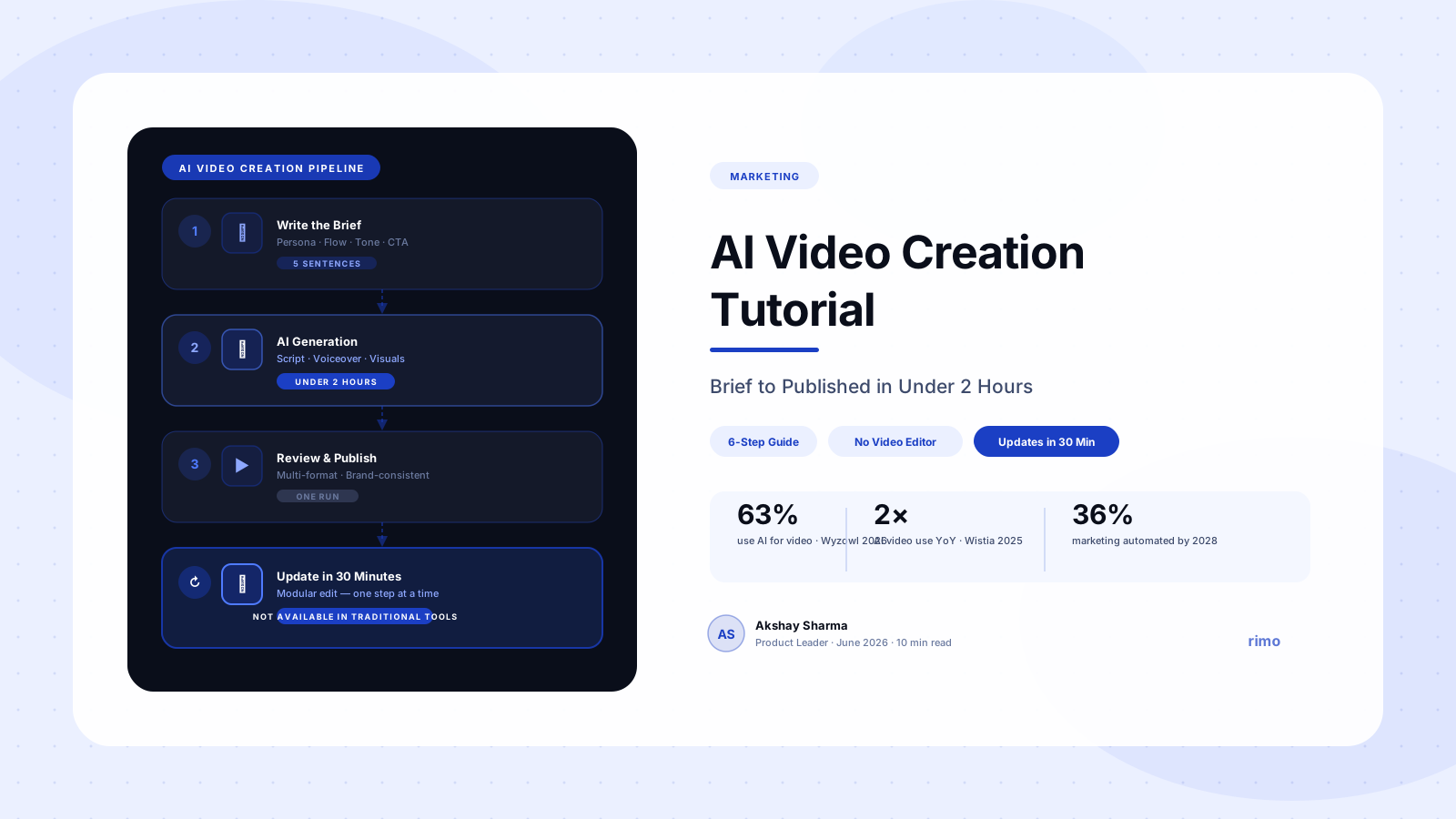
AI Video Creation Tutorial: Brief to Published Demo in Under 2 Hours
The marketing manager at a SaaS company spent three weeks coordinating a single demo video. She briefed a freelance editor, gathered screen recordings, went through four rounds of feedback, then watched the finished video go live. Two weeks later, engineering shipped a UI redesign that made the demo look wrong. The next video took the same three weeks. The one after that, the same again.
That cycle — brief, record, edit, review, publish, obsolete — is the standard B2B SaaS video production workflow. It was never designed for teams whose product changes every sprint. The problem isn't the tools. It's the workflow architecture those tools force: linear, specialist-dependent, optimized for a single production event rather than an ongoing video library.
This AI video creation tutorial walks through the exact process for breaking that architecture. Not a beginner's guide to consumer tools. A practical, step-by-step workflow for producing publication-grade product demo videos using AI — from brief to published in under two hours, with a process that holds up when the product ships something new next week.
In this guide
What makes AI video creation different for B2B SaaS
AI video creation is not a faster version of the old production process. It's a different architecture. Understanding that difference determines whether you get the full benefit or just a slightly faster version of the problem you already had.
The traditional model: record then edit
Traditional demo video production is a sequential pipeline. You gather requirements, write a script, set up a recording environment, capture several takes, hand off to an editor, go through feedback cycles, and export a final file. Every step depends on the one before it. The specialist requirement — a human who can operate editing software — is built into the pipeline.
Most B2B SaaS teams who complain about video production aren't really complaining about the tools. They're complaining about the dependency chain. One person gets sick, one round of feedback runs long, one UI change requires a re-record, and the entire pipeline stalls.
The AI model: brief to assembly
In an AI video maker workflow, the pipeline structure changes fundamentally. You provide a brief: who the audience is, what flow to demonstrate, what tone to use. The AI handles script generation, narration synthesis, visual assembly, and formatting. A trained editor is not a prerequisite. The pipeline is non-linear — you can update one section without re-running the whole production.
This matters for B2B SaaS specifically because the primary video production challenge in this context is not creating the first video. It's maintaining accuracy as the product changes. An AI-native workflow handles updates as a built-in feature rather than an exception that breaks the pipeline.
What you need before you start your AI video creation
Before running the six steps below, confirm you have four inputs. These are not optional context items — they are the raw materials the AI uses to generate output that reflects your product accurately. Skip one and you'll spend twice as long in revisions as you saved in production.
A defined audience persona
"Prospects" is not a persona. A workable persona for AI video creation looks like this: "Mid-market VP of Sales at a SaaS company, 200–500 employees, currently using spreadsheets for pipeline tracking, evaluating our CRM for the first time." The more specific the persona, the more accurately the AI calibrates messaging, tone, and what to emphasize in the flow.
A single flow to demonstrate
Pick one thing. Not a feature tour. Not an overview of the product. One end-to-end flow that maps to a specific problem this persona has. "Show how a user sets up an automated email sequence in under three minutes" is a flow. "Show the product" is not.
A five-sentence brief
This is the document that drives the entire AI video creation run. Answer: who is this for, what problem does this flow solve, what is the key moment where value becomes visible, what is the desired call-to-action, and what tone should the voiceover use. Five complete sentences — written before you open any tool.
Product access or organized screenshots
Depending on your AI video platform, you'll need either a live URL for the AI to capture screens, pre-built screenshots organized by step, or an existing screen recording the AI can reprocess. The quality of your visual inputs determines the quality of your output. This is where most first attempts go wrong — people bring mediocre screenshots to a production session and wonder why the output looks mediocre.
The 6-step AI video creation tutorial
This is the core of the AI video creation tutorial. Steps 1–3 happen before you touch the platform. Steps 4–6 happen inside it. The sequence is not optional — jumping to Step 4 without completing Steps 1–3 is the single most reliable way to produce something you'll need to redo.
Step 1: Write the brief in five-sentence format
Before you open any tool, write the brief. Use this structure: sentence one states the persona and their primary problem; sentence two names the exact flow; sentence three identifies the value moment; sentence four specifies the CTA; sentence five describes the tone.
A concrete example: "Our audience is a B2B marketing manager at a 100–500 person SaaS company who currently spends four hours per week manually creating demo clips for sales. This video shows how they can generate a branded demo video from a written brief in under 90 seconds. The value moment is when the finished video appears — no recording, no editing, no dependencies on a video team. The CTA is 'Start your free trial.' The tone is confident and direct, like a senior PMM talking to a peer."
That is a production brief. Every choice the AI makes — script length, pacing, emphasis, voiceover cadence — is calibrated against it.
Step 2: Build the step-by-step flow outline
Map the screen sequence you want to show — typically 6–10 steps for a 60–90 second demo. Each step gets three things: a screen label, a brief description of what's happening, and the narration intent for that moment (what should the voiceover communicate, not the exact words).
Keep steps atomic. "Log in, navigate to the dashboard, and set up the automation" is three steps, not one. The AI handles transitions between steps cleanly when each step represents a single action. Top-performing B2B SaaS demo videos use 7–12 focused steps at an average of 6–8 seconds per step — short enough to maintain attention, long enough for the action to land.
Step 3: Prepare your visual inputs
Organize the screenshots or recordings that correspond to each step in your outline. Name them sequentially. If you're using a platform that captures screens directly from a URL, test the capture flow before your main session.
One thing almost every AI video tutorial skips: clean your UI before capturing. Remove test data. Use realistic sample data that reflects what your target persona's account would actually look like — the right volume of records, realistic statuses, numbers that match the workflow scale of a real user. G2 reviewers who evaluate SaaS products consistently flag "obviously fake data" as a credibility problem that undermines otherwise well-produced demos. Your audience notices.
Step 4: Generate the script and voiceover
Input your brief into the AI video creation platform. Most platforms generate a script aligned with your brief, which you can edit before moving to production. Read it for accuracy first, then for tone.
When the script is approved, generate the voiceover. Review specifically for pronunciation accuracy on product names and technical terms — this is one of the most consistently mentioned complaints in G2 reviews of AI narration tools, cited across Synthesia, Descript, and other platforms. Most platforms let you correct pronunciation at the word level without regenerating the entire voiceover. Use this feature. A slightly off pronunciation on your own product name is the kind of thing viewers notice and remember.
Step 5: Assemble and review the video
With script, voiceover, and visual inputs ready, the AI assembles the video — syncing narration to screens, applying transitions, adding captions, inserting brand elements. Review the assembled output for three things: timing accuracy at each step, voiceover-to-screen synchronization, and brand consistency across colors, fonts, and logo placement.
Resist the urge to re-edit every second at this stage. Make a list of specific changes first, then batch-edit. Iterating screen by screen without a list is how AI video creation sessions turn into four-hour editing marathons instead of ninety-minute productions. Your demo video script template should guide the review — if it's not in the script, it's probably not in the video, and that's fine for version 1.0.
Step 6: Export, review, publish
Export for the primary format first — usually the version that lives on your product pages or gets shared in sales follow-ups. Get one stakeholder review on this version. Keep the review scope tight: does the video accurately represent the product, and does the CTA match the intended action?
Feedback like "the pacing feels slightly slow in the middle" is valid, but it should not gate publication of a first version. Ship version 1.0. Iterate from data — watch time, click-through on the CTA, sales team feedback after using it with real prospects. The SaaS demo video best practices that actually move the needle come from observing how real buyers engage with real videos, not from pre-publication committee review.
Briefed, built, and published in under two hours
Rimo takes your five-sentence brief and produces a brand-consistent demo video — script, voiceover, visuals, and multi-format export — without a video editor, a recording setup, or a six-week production cycle.
How to update your AI video when the product changes
This is the section that no other AI video creation tutorial covers. It's also the section that determines whether your video library stays accurate for a year or goes stale in six weeks.
The standard advice — "update the video when the product changes" — is useless without a process that makes updates cheap. In a traditional production workflow, updating a video means re-recording at minimum, and usually full re-production. That's why most B2B SaaS teams end up with demo libraries full of outdated content: the update cost is too high to trigger every sprint.
AI demo video generators change this calculation, but only if the platform supports modular editing. The practical workflow looks like this: identify the specific step that changed, isolate that segment in the editor, swap the screen for the updated one, regenerate only that narration segment, re-export. The rest of the video stays intact.
Before committing to any AI video platform, ask explicitly: can I update a single step without regenerating the entire video? If the answer is no, you have not solved the maintenance problem. You have made the creation phase faster while leaving the maintenance problem exactly where it was.
The real cost of video production isn't the license fee or the production time. It's the slow, invisible accumulation of videos that are slightly wrong — showing a UI that no longer exists, a pricing that changed, a flow that was redesigned. Most teams don't notice this until a prospect says "that's not what it looks like when I log in."
Getting to multi-format output from one AI video creation run
Most B2B SaaS teams need more than one format from a single piece of demo content. The version that lives on your product page is horizontal. The LinkedIn version is square or vertical. The email clip for sales follow-ups is trimmed to thirty seconds. The version for a specific persona has a different CTA.
Producing these separately in a traditional workflow multiplies your production time by three or four. In an AI-native workflow, multi-format output is a production step, not a separate project. After your primary video is approved, export variants by adjusting the aspect ratio, trimming the runtime, or modifying the CTA section — all from the same assembled project.
The platforms that handle this well treat multi-format output as a native capability: you declare your format requirements at the start of the session, and the AI maintains correct framing and text legibility across formats automatically. The ones that handle it poorly make you re-edit each format manually. LinkedIn is now B2B's top video channel — 8 in 10 B2B teams say it's their primary video distribution platform (Wistia, 2025). If your AI video platform doesn't produce LinkedIn-native output as part of the standard production run, you're adding a manual step after every video you produce.
Common mistakes in AI video creation
The mistakes that slow B2B SaaS teams down are rarely about the tools. They're about the assumptions teams bring into the workflow.
Writing the brief after the video is built
Some teams treat the brief as post-production documentation for something they already know they want. They open the tool first, start clicking, and write the brief retroactively once the video is mostly assembled. The AI generates mediocre output because it received mediocre inputs. The brief is not an administrative step. It is the production document that everything downstream depends on.
Trying to show everything in one video
The most persistent complaint across G2 reviews of demo video tools isn't about the tools. It's about the videos those tools were used to make. Reviewers describe watching demos that cover eight features in ninety seconds with no clear narrative and no obvious intended audience. AI video creation doesn't fix this problem — it makes the problem happen faster. The discipline of picking one flow and one persona is not a constraint. It's what makes a demo video usable.
Skipping the pronunciation review
AI voiceover is reliably good for standard language but consistently imperfect on proper nouns, brand names, and technical compound words. Synthesia users flag this in G2 reviews regularly. Ten minutes of pronunciation review before approval prevents a video from sounding subtly wrong at exactly the moments that matter most — your product name, your customers' industry terms, your feature names.
Using placeholder data in screen captures
Reviewers and prospects who evaluate SaaS products notice when the demo data doesn't reflect a plausible real account. "Acme Corp" with three records and a pipeline of exactly $100,000 signals that no one actually uses this product. Use data that looks like what a real user's account would contain. This is not cosmetic — it affects whether viewers believe the product is real and whether it would work for them specifically.
You don't need a video team, a recording studio, or a production budget to produce accurate, brand-consistent AI demo videos for B2B SaaS. You need a repeatable process, the right inputs, and a platform built to maintain a video library — not just create the first video.
The six steps above work as a standalone process. They also become the foundation for a production system that scales with your product — one where updating a demo takes thirty minutes, not three weeks, and where the video library reflects your product as it actually exists today.
For B2B SaaS teams that want to produce demo videos without a video editor, without an agency, and without a production cycle that outlasts their sprint cadence, Rimo is built for exactly this workflow. Brief in. Video out. Updated when the product ships.
Start free with Rimo → or book a demo to see a production session end to end.
FAQ
What is an AI video creation tutorial?
An AI video creation tutorial is a step-by-step guide for producing videos using AI-powered tools — covering how to write a production brief, generate scripts and voiceovers, assemble visuals, and export a finished video. For B2B SaaS teams, a useful AI video creation tutorial focuses on the specific workflow for product demo videos: how to define the audience, structure the demo flow, and maintain the video library as the product evolves.
How long does AI video creation take?
With a complete brief and organized visual inputs, most B2B SaaS teams can complete an AI video creation run — from brief to approved video — in 90 minutes to two hours. This is significantly faster than traditional demo video production, which typically runs four to eight weeks when factoring in scripting, recording, editing, review cycles, and export. AI platforms that support modular editing reduce update time for existing videos to 30–45 minutes per changed section.
What's the difference between AI video creation and traditional demo video production?
Traditional demo video production is a sequential, specialist-dependent pipeline: you capture footage, hand it to an editor, and export a finished file. AI video creation is a brief-to-assembly model: you provide inputs (persona, flow, tone), and the AI handles script generation, narration, visual assembly, and formatting without requiring a trained editor. The structural difference is that AI production is non-linear — you can update one section without re-running the whole pipeline.
Can AI video creation tools replace a video editor?
For B2B SaaS product demo videos, software walkthroughs, and feature announcements, yes — AI video creation platforms handle the full pipeline from brief to finished video without requiring human editing expertise. For content requiring cinematic-quality live footage, complex visual effects, or creative direction beyond product demos, a human editor remains necessary. Most B2B SaaS video needs fall in the first category, which is why 63% of video marketers now use AI tools in their production workflow (Wyzowl, 2026).
How do I update an AI video when my product changes?
The correct approach is modular editing: identify the specific step or segment that changed, isolate it in the editor, swap the screen for the updated version, regenerate only that narration segment, and re-export. The rest of the video remains intact. Before choosing an AI video platform, verify it supports segment-level editing — platforms that require full regeneration to update one scene have not solved the maintenance problem. Check the demo video mistakes that come from outdated libraries to understand why update velocity matters.
What is the best AI video creation tool for B2B SaaS?
The best AI video creation tool for B2B SaaS is one that supports the full pipeline — brief to finished video — without requiring a video editor, handles modular updates when the product changes, and produces multi-format output from a single production run. Rimo is built specifically for this use case: designed for B2B SaaS product marketing teams who need to produce and maintain a demo library at sprint velocity. For teams evaluating options, review the video production software buyer's guide for a detailed breakdown of categories and criteria.
Akshay Sharma
Product Leader · 10+ years in B2B SaaS
Akshay has spent 10+ years building and marketing B2B SaaS products. He writes about product storytelling, demo production, and the operational side of product marketing.