How Long Should a Product Demo Video Be?
The most common length for a B2B product demo video is "whatever the screen recorder stopped capturing." The PMM hits stop when they run out of things to say. The result: a seven-minute walkthrough that most prospects abandon at the 90-second mark, with the best part buried at the end.
Demo video length is one of those decisions that feels discretionary until you look at the watch-time data. The length of your demo is not a production detail — it directly determines whether anyone actually watches it, and whether watching it does anything to move a deal forward.
This guide answers how long a product demo video should be — not with a single number, but with a framework you can apply to every demo your team produces. By use case. By platform. By buyer persona. Because the answer changes depending on all three.
In this guide
- Why there is no single right length
- How long a product demo video should be by use case
- Product demo video length by platform
- How buyer persona changes the answer
- The one-recording, three-length approach
- The metric that actually tells you if the length is right
- FAQ
Why there is no single right length
Most advice on demo video length converges on "two to five minutes" and stops there. That answer is not wrong. It is just too blunt to be useful.
According to Wistia's 2025 State of Video Report, videos under one minute hold 50% average engagement — meaning half of viewers finish. Videos in the one-to-three minute range hold 46%. Three-to-five minute videos hold 45%. The dropoff between those ranges is small. What aggregate benchmarks do not show is the context the viewer was in when they hit play.
A buyer who just got cold-emailed and clicked a link is not in the same mindset as a buyer who navigated to your pricing page and actively chose to watch a demo. Same video, same length — completely different expectations. The pricing-page visitor will tolerate more time; the cold-outreach visitor will leave in 15 seconds if the opening line doesn't earn the next line.
Length is the wrong variable to optimise first. Context is the right variable. Once you know where a product demo video lives and who is watching it, the right length follows naturally — not the other way around.
There is also a structural reason teams end up with the wrong length: they let the recording tool decide. G2 reviews of popular screen recording tools show that teams frequently publish whatever the recorder captured — partly because editing is friction, and partly because free-plan video length caps force decisions at the wrong moment (G2, 2025–2026). The result is that demo length is determined by the tool's constraints or the presenter's endurance, not by what the viewer needs.
How long a product demo video should be by use case
Here is the framework. Each use case maps to a specific length range, with the reason behind it.
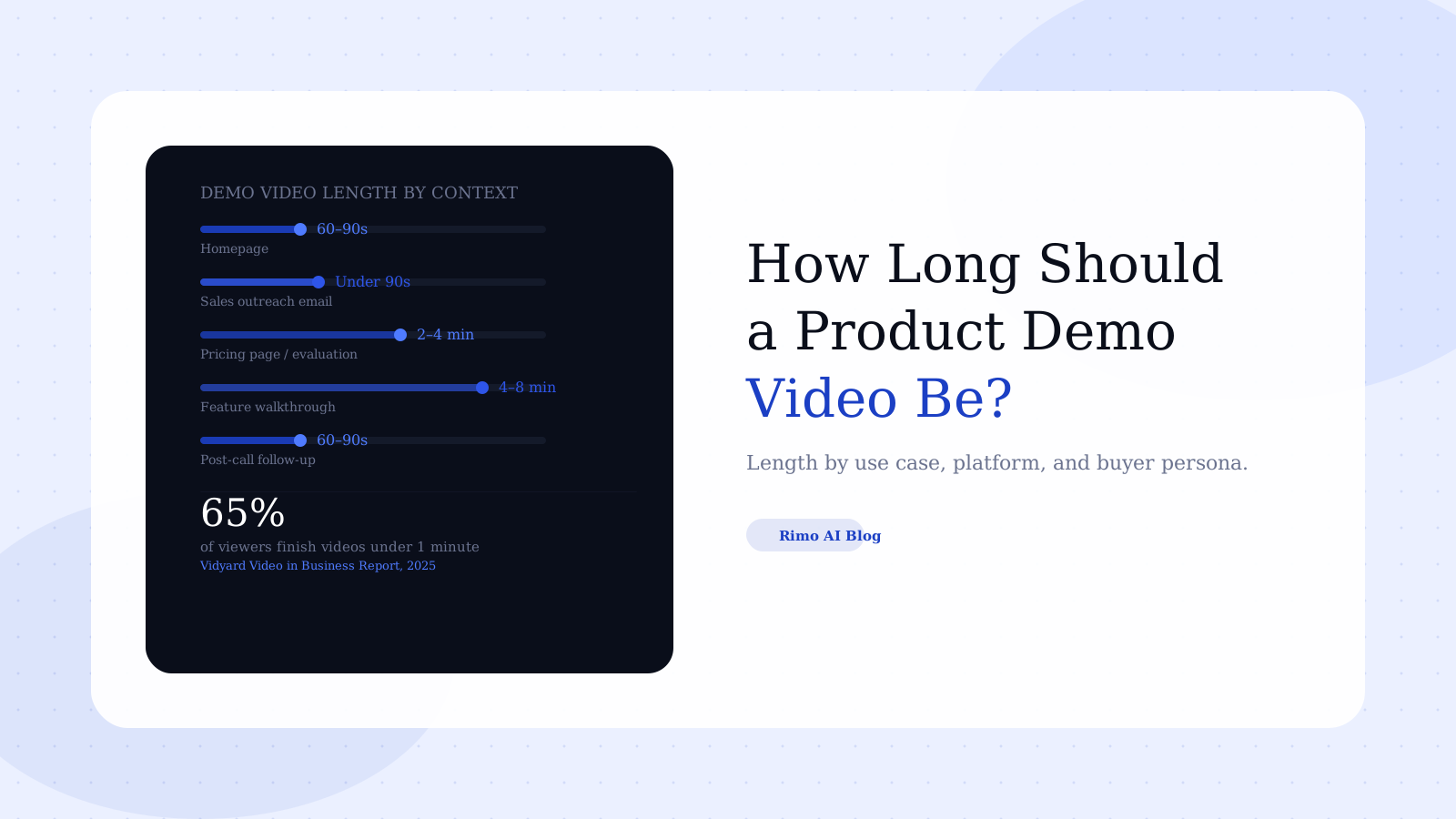
Homepage and above-the-fold: 60–90 seconds
A product demo video placed above the fold on the homepage competes with everything else on the page. The visitor has just landed. They have not yet committed to evaluating your product — they are deciding whether to stay at all.
Sixty to ninety seconds is enough time to show the problem, reveal the product doing something real, and end on a result. Go longer and you are asking for sustained attention you have not earned yet. Go shorter and you risk not showing anything compelling enough to prompt the next click.
The goal here is not conviction — it is interest. The homepage demo buys you the next click, not the signed contract.
Sales outreach email: under 90 seconds
When your SDR drops a demo link into a cold outreach, the prospect has three seconds to decide whether to click. If they do click, they have roughly fifteen seconds to decide if this is relevant enough to keep watching.
Vidyard's Video in Business Benchmark Report (2025) found that videos under one minute retain 65% of viewers all the way to the end. That number drops meaningfully as length increases. For cold outreach, under 90 seconds is not a stylistic preference — it is a completion-rate requirement. The only exception: if a prospect has already replied expressing interest, you can extend to two minutes. They have given you permission to take more of their time.
Pricing page or mid-evaluation: 2–4 minutes
By the time a buyer reaches your pricing page, they are in comparison mode. They are evaluating two or three alternatives. A two-to-four minute demo that shows a specific workflow — not a feature tour, but a real use case from start to output — earns that time because the viewer is actively trying to make a decision.
This is the format where depth pays off. A buyer at this stage wants to see what happens when something goes wrong, how the admin experience works, and what the actual output looks like. Ninety seconds does not answer those questions credibly.
Feature-specific walkthrough: 4–8 minutes
Feature walkthroughs are training assets, post-sale onboarding content, or deep-evaluation material for technical buyers. The audience here has already decided they want to understand more — they opted in, they are not passively watching.
Eight minutes is the practical upper limit. Above that, you are probably describing something that needs to be experienced interactively rather than watched. A well-structured eight-minute walkthrough with clear section markers outperforms a vague fifteen-minute one with no signposting.
Post-call follow-up: 60–90 seconds
After a discovery call or live demo, a follow-up video should be short — a personalised recap of the one or two things that actually mattered to that specific buyer. It is not a second product demo. It is a reference and a prompt to move forward.
Sixty to ninety seconds for this format forces specificity. If you cannot summarise what mattered in 90 seconds, you probably did not identify what mattered in the call.
A recurring theme in G2 reviews of video tools used for sales follow-up: buyers frequently mention receiving "too long" async videos that feel like a second pitch rather than a tailored recap (G2, 2025–2026). The complaint is not about the tool — it is about the sender's judgment on length. A short, specific follow-up video signals that you listened. A long one signals that you did not.
Product demo video length by platform: how distribution changes the answer
The same demo cut to the same length will perform differently across distribution channels — because platform shapes viewer expectations before the video even starts.
LinkedIn: Eighty-one percent of B2B marketing teams say LinkedIn is their primary video distribution channel (Wistia, 2025). But LinkedIn is scroll-first — autoplay with no sound, thumb-stopping first three seconds. For organic reach content, under 90 seconds. For deeper thought-leadership pieces embedded in articles, two-to-three minutes is reasonable — but the hook still has to land in the first few seconds regardless.
Your website: The website is the most permissive environment for demo video length. Buyers navigating your site are already interested enough to get there. Homepage demos respect the 60–90 second rule. Product feature pages and use-case pages can support two-to-four minute demos without significant drop-off, because the viewer context signals that they want more depth.
Sales email or async video tool: The shorter the better. Email inboxes are hostile to attention. When dropping a demo link into an outreach sequence, keep the video under 90 seconds. The job in an email is to earn a reply, not to close the deal.
YouTube: YouTube's algorithm rewards watch time and completion rate. For long-form product walkthroughs published for SEO or discoverability, structure the video with clear chapter markers so viewers can navigate directly to what they need. A 10-minute video with five clear chapters performs better than a 10-minute video that demands linear watching.
Stop guessing on length
Rimo generates the right-length demo for every context — from a 60-second homepage cut to a 4-minute pricing page walkthrough — without re-recording from scratch.
How buyer persona changes the answer
Three people at the same company may all watch your demo. They want very different things — and a different length of video.
The economic buyer (VP, Director, C-suite): Time is the scarcest resource. ROI is the lens for everything. This person wants a 60-to-90 second video that answers: what does this do, for whom, and what is the measurable business result? Skip the feature tour entirely. If the economic buyer sees a UI walkthrough before understanding the business case, you have lost them.
The champion (the person who found your product): They need enough detail to build a business case internally. A two-to-four minute demo covering the core use case — with a real workflow shown from start to finish — is right for this person. They will watch it twice and forward the link to colleagues. They need to believe it works before they will advocate for it.
The technical evaluator (the person who will implement it): They want to see under the hood. Configuration options, how data flows between systems, edge case handling. A five-to-eight minute feature walkthrough is appropriate here — but only for this audience, and only after they have raised a specific technical question.
The mistake most B2B SaaS teams make: one demo at one length, sent to all three. The economic buyer skips the feature walkthrough. The technical evaluator is frustrated by a 90-second overview that shows nothing implementable. Neither converts from a video that wasn't built for them.
The practical output from this: you need at least two versions of every demo. One for the top of the funnel — short, outcome-led. One for mid-funnel — detailed, use-case specific. Three versions is better.
A bad 90-second demo consistently underperforms a well-built 4-minute one. Length is not the problem. Density is. Every second either advances the story or wastes the viewer's time.
The one-recording, three-length approach
Producing multiple demo lengths sounds like significantly more work. It does not have to be.
The most efficient approach: record one comprehensive master demo — typically eight to twelve minutes, covering everything from high-level value through to specific workflows. Then cut three versions from it:
- 60–90 second cut: problem, solution, one result. Homepage, cold outreach, LinkedIn.
- 2–4 minute cut: the core use case, one full workflow, the output. Pricing page, mid-funnel nurture.
- Full walkthrough (5–8 minutes): kept close to the master recording. Technical evaluators, onboarding, post-sale education.
This approach keeps scripts, screen states, and branding consistent across all three versions. You are not producing three independent demos — you are editing one master recording into contextually appropriate cuts. Learning to create demo videos with a repeatable production process is what makes this sustainable at launch cadence.
The other advantage: when the product changes, you update the master recording and re-cut the shorter versions. You are not maintaining three independent recordings that go stale at different rates. If you are automating demo creation with AI tools, this workflow becomes significantly faster — update the brief, regenerate the relevant scenes, re-export the cuts.
The prerequisite for this strategy is getting the script structure right before you record. If the script is not modular — if each section is not self-contained — you cannot cleanly extract a 90-second version from an eight-minute master without re-recording. Modular scripting is what makes the multi-length strategy viable without multiplying your production time.
This is also where knowing the difference between a product demo video and a product explainer video matters. An explainer is conceptual — it can share the same overall structure across audiences. A demo video must show actual software doing actual things, and "actual things" means different scenes for different viewers.
The metric that actually tells you if the length is right
Stop asking "is this the right length?" Start asking: "where do viewers stop watching?"
Every serious video hosting tool provides a watch-time heatmap — a visual showing exactly where viewers exit. If 40% of viewers leave at the two-minute mark in a four-minute video, you have a two-minute problem, not a four-minute problem. Trimming the total runtime by a minute will not fix an exit that happens because the two-minute mark is where you pivot to a feature the viewer does not care about.
Watch-time data is the most direct signal you will ever get about whether your demo is structured correctly. The exit point is not random — it maps to a specific moment in the video where the narrative breaks down or the viewer's question goes unanswered.
Look for the drop point. Identify what is being said or shown at that moment. Edit around it — not by trimming the end, but by rewriting what happens at the exit point.
The other metric worth tracking is what the viewer does after watching. A 90-second homepage demo that generates 40 clicks to your pricing page beats a three-minute demo that generates 20 clicks — even though the longer video contains "more information." Length only matters in service of that downstream action. Optimise for what comes next, not for the video itself.
One more signal to watch: if buyers are still asking basic questions in discovery calls that the demo was supposed to answer, your mid-funnel demo is either too short, too generic, or structured in a way that doesn't match how buyers think about the problem. The demo should pre-answer the questions that slow the deal down.
The question "how long should a product demo video be?" has a real answer — it is just not a number. It is a framework: match the length to the placement, the buyer stage, and the persona watching. Build one master recording. Cut it for context. Measure where viewers stop watching and edit there.
If your current demo is a single recording published everywhere at the same length, that is the first thing to fix. Pick the highest-traffic context — your homepage, your pricing page, or your most-used sales sequence — and build the right-length video for that specific moment first. The rest follows from there.
Try Rimo free — generate a properly structured product demo video in under 30 minutes, at the right length for wherever it will live.
FAQ
How long should a product demo video be for a homepage?
Sixty to ninety seconds. Homepage visitors have not yet committed to evaluating your product — they are deciding whether to stay on the page at all. A tight 60–90 second demo that shows the problem, the product in action, and a clear result earns attention without demanding time the visitor has not offered. Going beyond 90 seconds on a homepage reliably hurts watch-through rate.
What is the ideal length for a sales demo video sent in a cold email?
Under 90 seconds. Vidyard's 2025 benchmark data shows that videos under one minute retain 65% of viewers through to completion. In a cold outreach context, you have not yet earned extended attention from the recipient. A personalised sales demo video maker output under 90 seconds that addresses the prospect's specific situation performs significantly better than a generic full-length product demo embedded in a cold sequence.
Can a product demo video be too short?
Yes. A 30-second demo can create interest but rarely creates conviction — which means it may generate clicks without generating enough understanding to convert. Short demos work at the top of the funnel, where the goal is the next click, not the final decision. In mid-funnel or decision-stage contexts, a demo that is too short leaves buyers without the information they need to move forward with confidence.
Should I create different length demos for different buyer personas?
Yes, and this is one of the highest-leverage content decisions a B2B SaaS marketing team can make. Economic buyers (VPs, C-suite) need a 60–90 second ROI-focused version. Champions need a 2–4 minute use-case demo with enough detail to build an internal case. Technical evaluators need a 5–8 minute workflow walkthrough. One demo at one length does not serve any of these personas well. If you are unsure which content type fits each persona, understanding what separates a demo video from an explainer video is a useful starting point — they serve different buyers at different moments.
How do I know if my current demo video is the right length?
Check the watch-time drop curve in your video analytics. The point where viewers exit is more diagnostic than the total runtime. If 50% of viewers leave at the 90-second mark of a four-minute video, your effective length is 90 seconds — not four minutes. Edit toward the exit point, not toward the total runtime. Also check what action viewers take after watching — that downstream behaviour tells you whether the demo is doing its job.
Does a longer demo video help with SEO?
Not directly. Video length does not improve or damage page SEO on its own. What matters for SEO is time-on-page and user engagement signals — both of which a well-structured, right-length video can improve. A 90-second demo that holds 70% of viewers to completion sends stronger engagement signals than a five-minute demo where 80% exit within the first minute.
Akshay Sharma
Product Leader · 10+ years in B2B SaaS
Akshay has spent 10+ years building and marketing B2B SaaS products. He writes about product storytelling, demo production, and the operational side of product marketing.


