ChatGPT Ads for Business: The Complete Guide (2026)
For two decades, B2B marketing teams have built their paid media playbooks around the same handful of channels: Google Search, LinkedIn, Meta, and more recently X. In February 2026, OpenAI added a new one. ChatGPT Ads went live for U.S. users on the Free and ChatGPT Go tiers, and by May 2026 OpenAI's self-serve platform removed the $50,000 minimum spend that had kept the channel limited to large enterprise advertisers during its pilot phase.
That second detail is the one that matters for most marketing teams reading this. ChatGPT advertising is no longer an enterprise-only beta. It's a self-serve channel any B2B SaaS company can open an account on today — and it's launching into a platform that, as of mid-2026, still commands more web-visit share than every other AI assistant combined.
This guide covers what ChatGPT Ads actually are, who sees them, how the campaign structure compares to platforms you already know, and — most importantly — how to write the one genuinely new input the platform asks for: Context Hints.
In this guide
- What are ChatGPT Ads?
- Who actually sees ChatGPT Ads
- Why ChatGPT is the AI ad channel that matters first
- Campaign structure: what's familiar from Meta and X
- Context Hints: the one genuinely new concept
- Ad format and creative specs
- How to launch your first ChatGPT Ads campaign
- Common mistakes B2B teams make early
- FAQ
What are ChatGPT Ads?
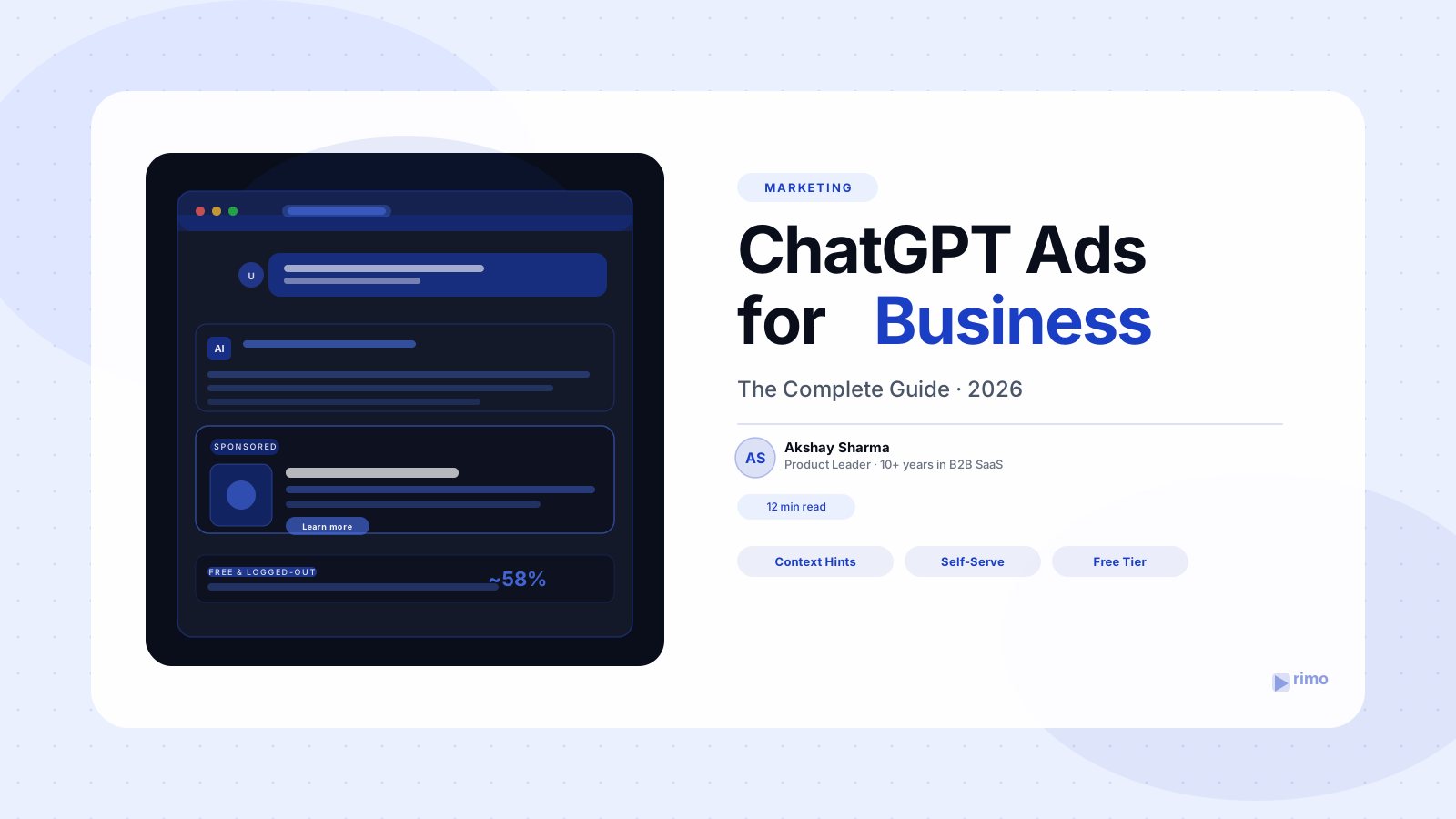
ChatGPT Ads are sponsored placements that OpenAI shows inside ChatGPT conversations — small, clearly labeled cards that appear below an AI-generated answer, suggesting a relevant product, tool, or service related to what the user just asked about.
The mechanics are deliberately constrained compared to a search ad or a social feed ad. An ad does not get inserted into the model's answer, and it cannot influence what the model says. Instead, once ChatGPT finishes responding to a prompt, the system separately evaluates whether a sponsored recommendation is relevant to that conversation and, if so, renders a small card underneath the response — visually distinct, labeled as sponsored, and disconnected from the answer text itself.
For a B2B SaaS marketer, the easiest mental model is this: someone asks ChatGPT a question that's adjacent to your category — "what's the best tool for X," "how do teams typically handle Y," "what should I look for in a Z platform" — and your ad has a chance to appear as a relevant suggestion immediately after that answer, while the topic is still front of mind.
Who actually sees ChatGPT Ads
This is the single most important targeting fact in the entire platform, and it's easy to miss if you're skimming: ads are only shown to ChatGPT's free and logged-out users.
Specifically, ads are not shown to anyone on a ChatGPT Plus, Pro, Business, Enterprise, or Team plan. They also aren't shown to users that ChatGPT identifies — or predicts — to be under 18. The inventory you're buying is exclusively the free tier and the logged-out/anonymous experience.
At first glance, this might look like a downside — "my buyers are on Plus, why would I advertise to free users?" But for most B2B categories, this framing gets the funnel backwards. The free tier and logged-out experience is where:
- Early-stage researchers live. Someone exploring a new category — "what is a [your category] tool," "how do companies usually solve [problem]" — is overwhelmingly likely to be doing that research on a free account, possibly before they've even decided this is a work project worth a paid seat.
- Individual contributors and influencers sit, even at companies where the eventual buyer has an Enterprise seat. The person who first types "best tools for X" into ChatGPT and brings a shortlist to their manager is frequently not the one with the paid subscription.
- Top-of-funnel awareness gets built, which is exactly the stage where paid media has always played — you're not trying to close a deal inside a chat window, you're trying to get into the consideration set before the buyer opens a tab to research vendors.
In other words, ChatGPT Ads behave less like a bottom-funnel search ad and more like a contextually-targeted awareness and consideration play — similar in role to a well-targeted LinkedIn or Meta campaign aimed at category-defining moments, just delivered inside an AI conversation instead of a feed.
Why ChatGPT is the AI ad channel that matters first
If you're a marketing team trying to decide where to place a first bet on AI-assistant advertising, the traffic data makes the decision for you, at least for now.
As of mid-2026, ChatGPT still holds a commanding share of AI assistant usage — roughly 53–59% of web-visit share depending on the measurement, with Google Gemini a distant second at around 19–27% and every other assistant (Claude, Perplexity, Copilot, Grok, DeepSeek) splitting the remainder in single digits. In B2B referral traffic specifically, ChatGPT's share of measurable AI referrals sits around 62%.
It's also the AI assistant most B2B buyers reach for during informal, exploratory research — the "let me just ask ChatGPT" moment before a buyer opens a comparison site or a search tab. If you've read our guide to answer engine optimization, this is the same shift reshaping organic discovery — except here, instead of earning a citation, you can pay for placement in that moment. Other assistants will likely open ad platforms too, but for now ChatGPT is where the volume and the B2B research behavior already are.
Campaign structure: what's familiar from Meta and X
Here's the good news for any performance marketer who has run a Meta or X (Twitter) Ads account: most of ChatGPT's campaign structure will feel immediately familiar. OpenAI built its self-serve platform on the same hierarchical model that's been the industry standard for over a decade.
Campaign level — You set your overall objective and budget here. Campaign-level controls include your total budget (or daily budget), campaign duration, and the high-level goal you're optimizing for (such as driving traffic to a landing page or maximizing conversions on your site, depending on what's available at launch in your market).
Ad group / targeting level — Within a campaign, you create one or more ad groups, each with its own targeting configuration. This is where most of the platform-specific decisions live: audience parameters, geography, language, device, and — the new piece — Context Hints (more on this below). If you've ever split a Meta campaign into multiple ad sets to test different audiences against the same creative, this is the same idea.
Ad level — The actual creative: your image, headline, description, and destination URL. Just like Meta and X, you can run multiple ad variations within an ad group to test which creative performs best against the same targeting.
Bidding and budget controls — Daily or lifetime budgets, and bid strategies that should feel familiar from any auction-based ad platform — you're competing for placement against other advertisers whose context hints and targeting also match a given conversation.
Reporting — Standard funnel metrics: impressions, clicks, click-through rate, cost per click, and conversion tracking via a pixel or API integration on your site, again mirroring the reporting structure of Meta Ads Manager or X Ads.
If your team already runs paid social, the lift to stand up a ChatGPT Ads account is mostly learning one new interface — not relearning campaign structuring, budget pacing, or creative testing. What doesn't transfer is the targeting input with no real equivalent on Meta or X: Context Hints.
Context Hints: the one genuinely new concept
Every other targeting lever in ChatGPT Ads has a rough analog elsewhere — audience parameters look like Meta's audience controls, geography and language targeting look like any platform's location settings. Context Hints are different. They're the one concept that's genuinely new, and OpenAI's own documentation is, candidly, thin on how to use them well.
A Context Hint is a free-text field — essentially a large text box — where you describe the conversations you want your ad to be eligible to appear alongside. Rather than bidding on keywords or building an audience from demographic and behavioral signals, you're describing the conversational context in which your product is relevant. ChatGPT's ad system uses this description, along with the actual content of a user's conversation, to decide whether your ad is a good match for a given moment.
Because this is new for everyone, there's no established playbook yet — but based on how the underlying matching works (contextual relevance to the conversation, not keyword exact-match), here's how we recommend B2B teams structure their Context Hints. Think of it as three layers, all worth including in the same hint:
1. Conversations your ICP personas are likely having
Describe the kinds of questions your actual buyer personas ask ChatGPT — in their language, not yours. If you sell supply chain software, that might mean conversations a supply chain manager has about inventory visibility, vendor risk, or demand forecasting. If you sell a marketing platform, it's conversations a CMO or product marketing manager has about campaign attribution, content production bottlenecks, or go-to-market planning.
The goal is to give the matching system a description of who is likely to be having a relevant conversation and what they're asking about — not just what your product does.
2. Conversations evaluating products in your category — including competitors
Describe conversations where someone is actively comparing tools in your space: "what's the best [category] tool," "[Competitor A] vs [Competitor B]," "alternatives to [Competitor]," "is [category] worth the cost for a team our size." This is the closest thing ChatGPT Ads has to bottom-funnel intent — someone in an active evaluation, asking the AI to help them shortlist. Naming the category clearly, and being willing to reference the competitive landscape your buyers are actually asking about, gives the system the clearest signal that this is a buying-intent conversation.
3. Conversations about your product's use cases across industries
Describe the specific jobs your product gets used for, across the different industries and team types you sell into. A demo video platform, for example, might describe conversations about "creating product demo videos for SaaS sales teams," "automating screen recordings for customer onboarding," or "building a video library for marketing teams without a video editor." The more specific and use-case-grounded this language is, the better the system can match it to a real conversation rather than a generic category mention.
Write your Context Hint like a brief, not a tagline. Combine all three layers — personas, competitive evaluation language, and use-case-by-industry detail — into one descriptive block of text, written the way your buyers actually talk. The matching system has more to work with when your hint reads like a research summary of your ICP's conversations, not a one-line value proposition.
One practical note: because Context Hints are evaluated against live conversation content, they benefit from the same language discipline that matters for generative engine optimization — use the exact phrases your buyers use when they describe their problems, not internal jargon or invented category names. If your organic AEO content and your Context Hints use consistent language, you're reinforcing the same brand-topic associations across both paid and earned AI visibility.
Ad format and creative specs
If Context Hints are the new, expansive part of the platform, the ad creative itself is the opposite: small, constrained, and unforgiving of vague messaging.
A ChatGPT ad consists of exactly six elements:
- Advertiser name — your brand name as it appears on the card
- Favicon / logo — a small square brand mark
- Title — a short headline, with a hard limit of 50 characters
- Description copy — up to 100 characters, shown as one or two short lines
- Image — a square (1:1) creative asset, up to 1200×1200px (JPG, PNG, or WEBP)
- Landing page URL — where the click goes
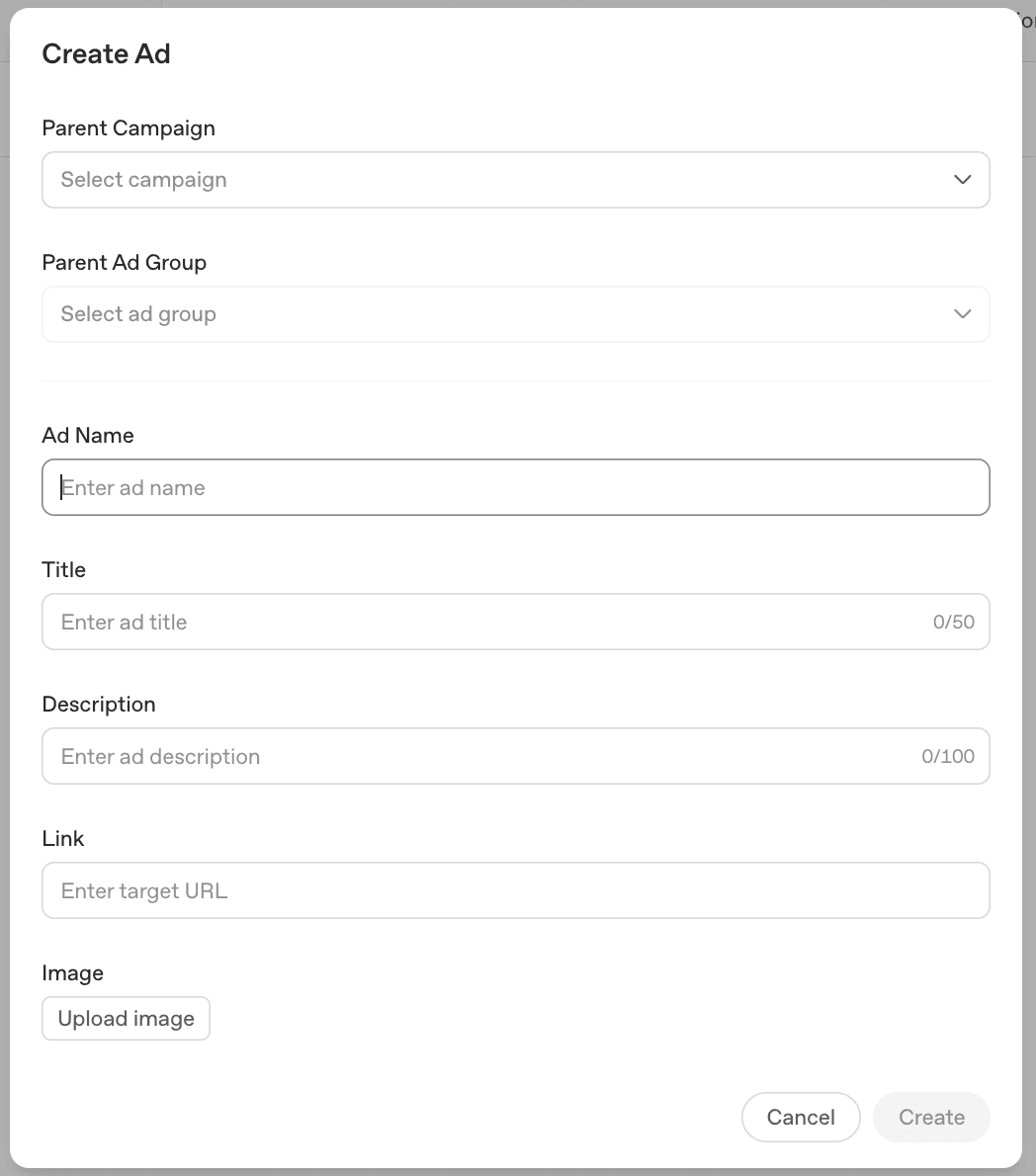
The platform's hard limits are 50 characters for the title and 100 for the description — but that's the ceiling, not a target. The best-performing ads tend to sit well under those caps: a title closer to 20–30 characters reads as a headline rather than a sentence fragment, and a description of 40–60 characters keeps the card scannable in the half-second a user spends on it. Use the extra room the limits give you for a unit of specificity (a use case, an outcome, a number) rather than padding out a generic line to fill the space.
That's the entire creative surface: one small square image, one short title, and a description that's closer to a text message than ad copy. There's no room for a value proposition with three clauses, a feature list, or a clever multi-line setup. Every word has to work.
Because the card renders below an AI answer — already part of a focused, contextual moment — the creative doesn't need to re-explain what category you're in or grab attention from a noisy feed. The user just received an answer related to your space; the ad's job is to be an obviously relevant, single-idea next step. "The tool for [specific job]" beats "The all-in-one platform for [broad category]" in this format almost every time, because specificity is the only thing that fits.
This is the same lesson that applies across AI-native marketing surfaces: the constraint forces clarity. A title and two lines of description should answer one question — "is this relevant to what I was just asking about?" — and nothing else.
How to launch your first ChatGPT Ads campaign
Putting the pieces together, here's the practical sequence for a B2B team running its first campaign:
Step 1 — Define one specific use case, not your whole product. Pick the single workflow or job your product does best for one persona. Resist the urge to advertise "the platform" — the creative format won't support it, and the Context Hint will be stronger if it's anchored to something specific.
Step 2 — Write the Context Hint using all three layers. Describe your ICP persona's conversations, your category's competitive-evaluation conversations, and your specific use case across the industries you sell into — combined into one descriptive block.
Step 3 — Design creative around the constraint. Build a square image that communicates the use case visually without relying on the title or description to do all the work. Write a title under 24 characters and description under 48 that name the specific outcome, not the category.
Step 4 — Point the landing page at the use case, not the homepage. Since the ad is contextually triggered by a specific kind of conversation, the landing page should continue that thread — a use-case page, not a generic homepage that makes the visitor re-orient.
Step 5 — Set a modest test budget and let the contextual match work. Because this is an auction-based, contextually-matched system with no established benchmarks yet for most B2B categories, treat the first few weeks as a learning phase — start small, watch click-through rate and landing page engagement, and iterate the Context Hint and creative together before scaling spend.
Step 6 — Track downstream, not just clicks. Given that this inventory sits at the early-research end of the funnel — free and logged-out users — the immediate conversion rate on a click may look modest compared to bottom-funnel channels. Make sure your attribution setup can connect this traffic to pipeline over a longer window, not just last-click conversions.
Common mistakes B2B teams make early
A few patterns are worth getting ahead of before you spend your first dollar:
Treating Context Hints like keyword lists. A hint that's just category keywords ("demo video software, screen recording, sales enablement") gives the matching system far less to work with than a descriptive paragraph about real conversations. Write it as prose, not a tag cloud.
Writing creative for a feed instead of a conversation. Ad copy that tries to "stop the scroll" feels out of place below a focused AI answer. The ad should feel like a relevant footnote, not an interruption.
Expecting bottom-funnel conversion rates from top-of-funnel inventory. This is exclusively free and logged-out traffic — some is a future buyer doing early research, some won't convert for months. Set measurement windows accordingly.
Letting Context Hints and AEO content drift apart. If your organic content (built for LLM citations and AEO) describes your product one way, and your Context Hints describe it another, you're sending mixed signals to both AI systems and the humans reading either surface.
The takeaway
ChatGPT Ads are a genuinely new channel, but they're not a foreign one. The campaign structure — campaigns, ad groups, creative testing, auction-based bidding — will be familiar to anyone who has run Meta or X Ads. The audience is exclusively free and logged-out ChatGPT users, which makes this fundamentally a top-of-funnel awareness and consideration channel, not a bottom-funnel close. And the one genuinely new input — Context Hints — rewards teams that describe their buyers' real conversations in detail: who they are, what they're comparing, and what specific job your product does for them.
With the $50,000 minimum gone, this is no longer a channel reserved for enterprise budgets. For B2B SaaS marketing teams already running paid social, ChatGPT Ads is a low-lift extension of a motion you already have — and given that ChatGPT still commands the majority of AI assistant traffic in 2026, it's the AI ad channel worth testing first.
If your Context Hints and ad creative point to a use-case landing page, the next thing that page needs is a demo that backs up the claim in two lines of ad copy. Rimo turns product briefs into polished demo videos without a production team — useful for exactly the kind of specific, use-case-anchored landing pages this new channel rewards.
FAQ
Who sees ChatGPT Ads?
ChatGPT Ads are shown only to users on ChatGPT's Free tier and to logged-out/anonymous users. They are not shown to anyone on a Plus, Pro, Business, Team, or Enterprise plan, and not to users ChatGPT identifies or predicts to be under 18. This makes ChatGPT Ads inventory inherently top-of-funnel — early-stage researchers and casual users rather than paid subscribers.
What is a Context Hint in ChatGPT Ads?
A Context Hint is a free-text field where advertisers describe the types of conversations their ad should be eligible to appear alongside. Instead of bidding on keywords, you describe the conversational context — who is likely having the conversation, what they're asking about, and how your product is relevant. OpenAI's matching system uses this description, along with the live conversation content, to decide whether to show your ad. For B2B advertisers, effective hints typically combine ICP persona language, competitive-evaluation conversations, and specific use cases across industries.
How is ChatGPT Ads campaign structure different from Meta or X Ads?
It largely isn't. ChatGPT Ads uses the same campaign → ad group → ad hierarchy as Meta and X, with campaign-level budgets and objectives, ad-group-level targeting (including Context Hints), and ad-level creative testing across multiple variations. The reporting metrics — impressions, CTR, CPC, and conversions — are also standard. The main difference is the targeting input at the ad-group level: Context Hints replace audience-building and keyword targeting with a descriptive, conversation-based input.
What are the ad format specs for ChatGPT Ads?
A ChatGPT ad consists of six elements: advertiser name, a square logo/favicon, a title (roughly 16–24 characters), description copy (roughly 32–48 characters, about two short lines), a square 1:1 image asset up to 1200×1200px (JPG, PNG, or WEBP), and a landing page URL. The ad appears as a clearly labeled sponsored card below a ChatGPT answer.
Is there still a minimum spend to advertise on ChatGPT?
No. OpenAI's initial 2025 pilot required a $50,000 minimum spend, limiting the channel to large enterprise advertisers. The self-serve platform launched in May 2026 removed that minimum entirely, opening ChatGPT Ads to small businesses, startups, and mid-market companies.
Why should B2B SaaS teams prioritize ChatGPT over other AI ad platforms?
Traffic share. As of mid-2026, ChatGPT holds roughly 53–59% of AI assistant web-visit share — more than the next several competitors combined — and around 62% of measurable B2B AI referral traffic. While other AI assistants are expected to open ad platforms over time, ChatGPT currently has both the largest audience and the most established self-serve advertising infrastructure, making it the most practical first AI ad channel for B2B SaaS teams to test.
Tags: ChatGPT Ads · OpenAI Advertising · Context Hints · B2B SaaS · AI Search Marketing · Paid Media
Akshay Sharma
Product Leader · 10+ years in B2B SaaS
Akshay has spent 10+ years building and marketing B2B SaaS products. He writes about product storytelling, demo production, and the operational side of product marketing.