How to Launch ChatGPT Ads Campaign (2026)
If you've read our complete guide to ChatGPT Ads, you know the strategic picture: free and logged-out ChatGPT users, a campaign structure that borrows heavily from Meta and X, and one new concept — Context Hints — that determines whether your ad shows up in a relevant conversation.
This guide is the operational follow-up. It walks through OpenAI's Ads Manager exactly as you'll encounter it: the three-level hierarchy of Campaign → Ad Group → Ad, every meaningful setting at each level, and how to think about structuring your first launch so you're not guessing at defaults.
In this guide
- The three-level structure: Campaign, Ad Group, Ad
- Step 1: Creating a Campaign
- Step 2: Creating Ad Groups
- Step 3: Creating Ads
- Conversion tracking: Pixel and Conversions API
- A sample structure for a B2B SaaS launch
- Common setup mistakes
- FAQ
The three-level structure: Campaign, Ad Group, Ad
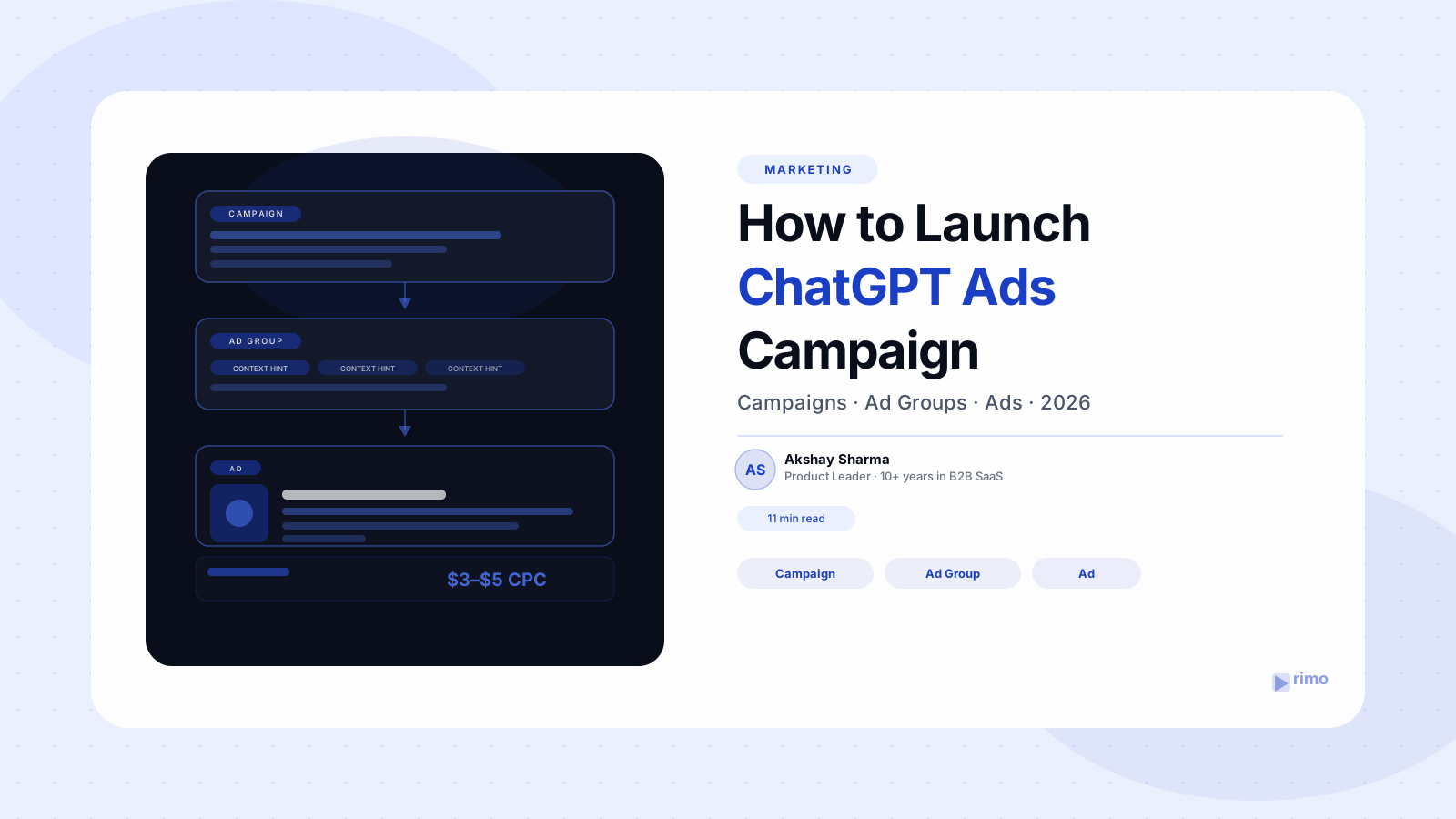
OpenAI's Ads Manager is built around the same three-tier hierarchy that anyone who has used Meta Ads Manager or X Ads will recognize immediately:
- Campaign — the top-level container. This is where you set your objective, budget, schedule, and country-level targeting. Everything below a campaign inherits its objective and budget logic.
- Ad Group — sits inside a campaign. This is where targeting gets specific: Context Hints, audience lists, and (increasingly) geographic and device-level adjustments. Each ad group should represent a single theme, intent, or persona.
- Ad — sits inside an ad group. This is the actual creative unit a user sees: the image, title, description, and landing page.
The reason this hierarchy matters operationally is that each level answers a different question. The campaign answers "how much am I spending and on what objective?" The ad group answers "which conversations should this be eligible to appear in?" The ad answers "what does the user actually see?"
Getting the structure right before you touch any settings saves you from the most common early mistake: cramming multiple personas, use cases, or offers into a single ad group and then being unable to tell which targeting or creative is driving performance.
Step 1: Creating a Campaign
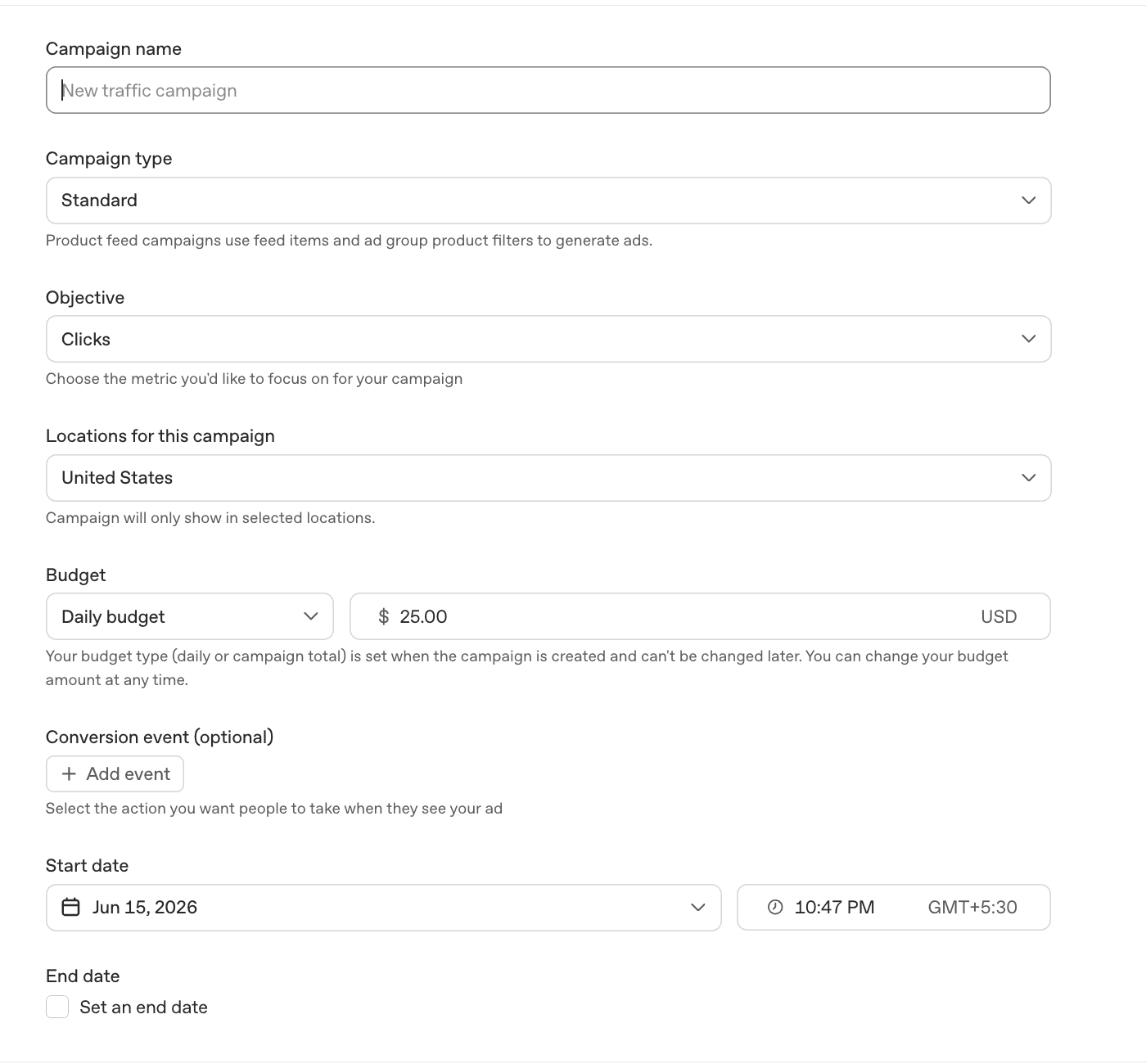
A campaign defines four things: objective, budget, schedule, and country-level targeting. Everything else happens at the ad group and ad level.
Choosing an objective
At launch, OpenAI offers two campaign objectives, with a third on the way:
- Reach — buy on a CPM (cost-per-thousand-impressions) basis. Use this when the goal is awareness — getting your brand and ad creative in front of relevant conversations, regardless of whether someone clicks.
- Clicks — buy on a CPC (cost-per-click) basis. Use this when the goal is driving traffic to a landing page, and you want to pay only when someone actually clicks through.
- Conversions — listed as "coming soon" at launch, this objective will let advertisers optimize toward post-click actions directly, building on the Pixel and Conversions API infrastructure OpenAI shipped in mid-2026.
For most B2B SaaS teams running a first test, Clicks (CPC) is the more sensible starting objective. It ties spend directly to traffic, which is easier to evaluate against your existing landing page and pipeline metrics than a pure impression-based buy.
Setting your budget
You choose between a daily budget and a campaign (lifetime) budget. This is one of the few choices in the platform that's effectively permanent — OpenAI doesn't let you switch between daily and lifetime budget types after a campaign is created, though you can still adjust the amount.
- A daily budget is the better default for an always-on test, since it gives you a consistent, predictable spend rate while you evaluate performance.
- A campaign budget makes more sense for a time-bound push — a product launch window, a conference, or a fixed-duration experiment — where you want OpenAI's delivery system to pace spend across a known start and end date.
The practical advice here mirrors any new ad platform: don't spread a small test budget across many campaigns. Distribute your total planned spend based on priority, and make sure each campaign has enough budget to generate a meaningful number of impressions or clicks — an underfunded campaign won't produce a useful signal either way.
Bidding
Your bidding options depend on the objective you picked:
- Reach (CPM) campaigns default to a maximum bid of $60 CPM. You can adjust this, but $60 is the platform default if you don't.
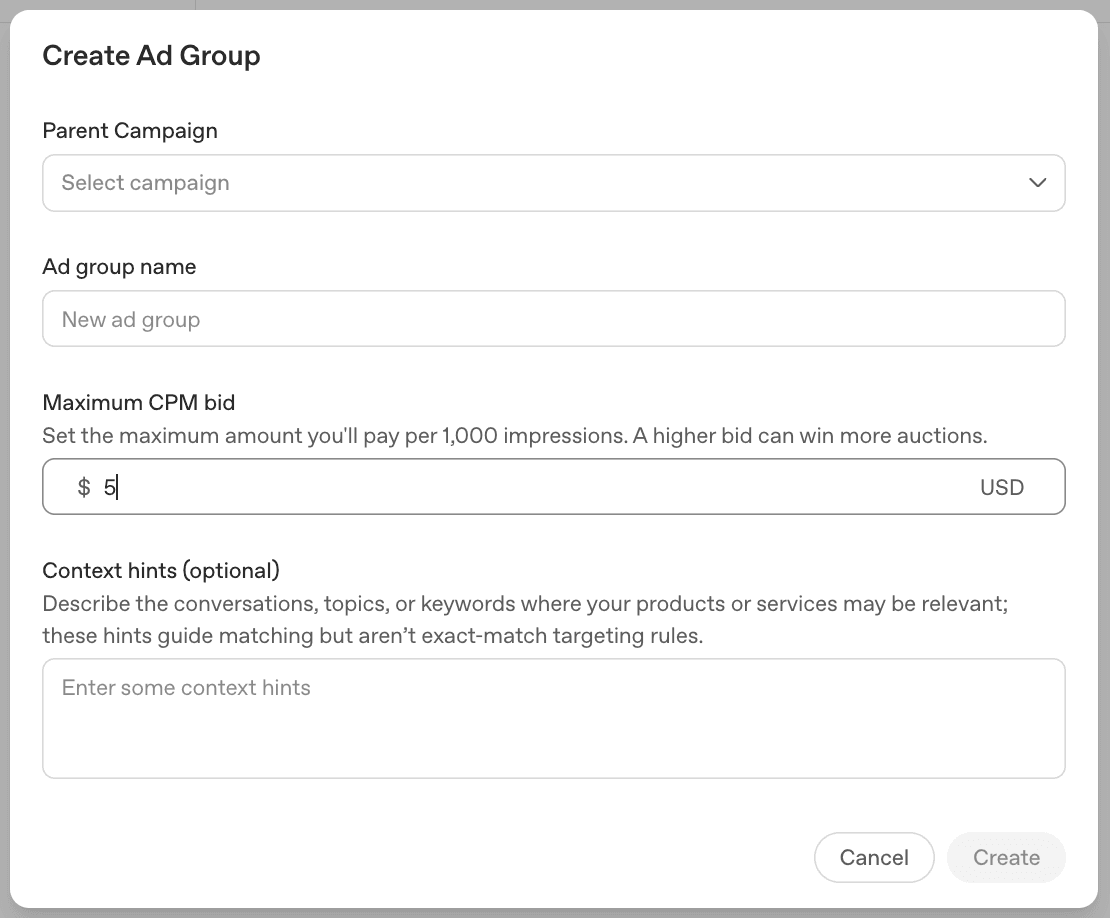
- Clicks (CPC) campaigns let you set a custom maximum bid. OpenAI's own recommendation for a starting point is $3 to $5 per click.
Behind the scenes, ad delivery runs through a relevance-weighted, second-price auction — the same mechanism that underlies most modern ad platforms. Your bid sets a ceiling, but how often you win placement also depends on how relevant your ad (and its Context Hints) is to the conversation. A highly relevant ad with a moderate bid can out-deliver a less relevant ad with a higher one.
Schedule and country targeting
Campaigns also define start and end dates (relevant primarily for lifetime-budget campaigns) and country-level targeting. At launch, advertiser geo-targeting at the campaign level covers the US, Canada, Australia, and New Zealand. More granular geography — state, DMA (designated market area), and ZIP code — is configured at the ad group level, which we cover next.
Step 2: Creating Ad Groups
If the campaign is where you decide how much and toward what goal, the ad group is where you decide who and in what context. This is the level that carries the most strategic weight — and the level most teams under-invest in during their first setup.
Context Hints: 5–10 per ad group, one intent each
Context Hints are the free-text descriptions of conversations your ad should be eligible to appear alongside — covered in depth in our complete guide. At the ad group level, the operational guidance is specific: aim for roughly 5 to 10 context hints per ad group, all tightly clustered around a single intent, persona, or use case.
If you find yourself wanting to target a second persona or a second use case, create a second ad group rather than adding more hints to the first. Mixing intents inside one ad group makes it harder to tell which hint is driving matches, and harder to write creative that speaks to everyone at once. The practical rule: one ad group, one problem.
For example, a demo-video platform selling to both product marketing teams and sales engineering teams shouldn't combine both personas' context hints into one ad group. Two ad groups — one with hints describing product marketing conversations (launch videos, feature announcements, content production bottlenecks) and one with hints describing sales engineering conversations (demo environments, proof-of-concept walkthroughs, technical buyer education) — let you run different creative against each, and tell you which persona is responding.
It's worth remembering that context hints are not exact-match keywords and don't guarantee delivery into any specific conversation. Ad selection weighs the hints alongside your landing page, ad title, and ad copy — so the hints work best when they're consistent with what the rest of your ad actually says.
Audience targeting
Beyond context hints, ad groups support custom audience targeting via file upload — CSV or TXT files (up to 512MB) containing hashed or raw email addresses and phone numbers, which can be used to either target or exclude specific users. For B2B teams, the most common use is exclusion: uploading your existing customer list so you're not spending impressions on people who already use your product.
Geographic and device adjustments
While country-level targeting is set at the campaign level, ad groups support more granular geo-targeting by state, DMA, and ZIP code (US only at launch), plus bid adjustments — percentage increases or decreases applied across device types, geographies, or conversation characteristics. These adjustments are optimization tools for later in a campaign's life, once you have enough data to see where performance is concentrated; they're not something a first-time setup needs to configure on day one.
Name your ad groups so the strategy is visible in the interface. Something like "PMM – Launch Video Conversations" or "Sales Eng – Demo Environment Conversations" tells you, three weeks from now, exactly what each ad group's context hints were trying to capture — without having to re-open and re-read the hints themselves.
Step 3: Creating Ads
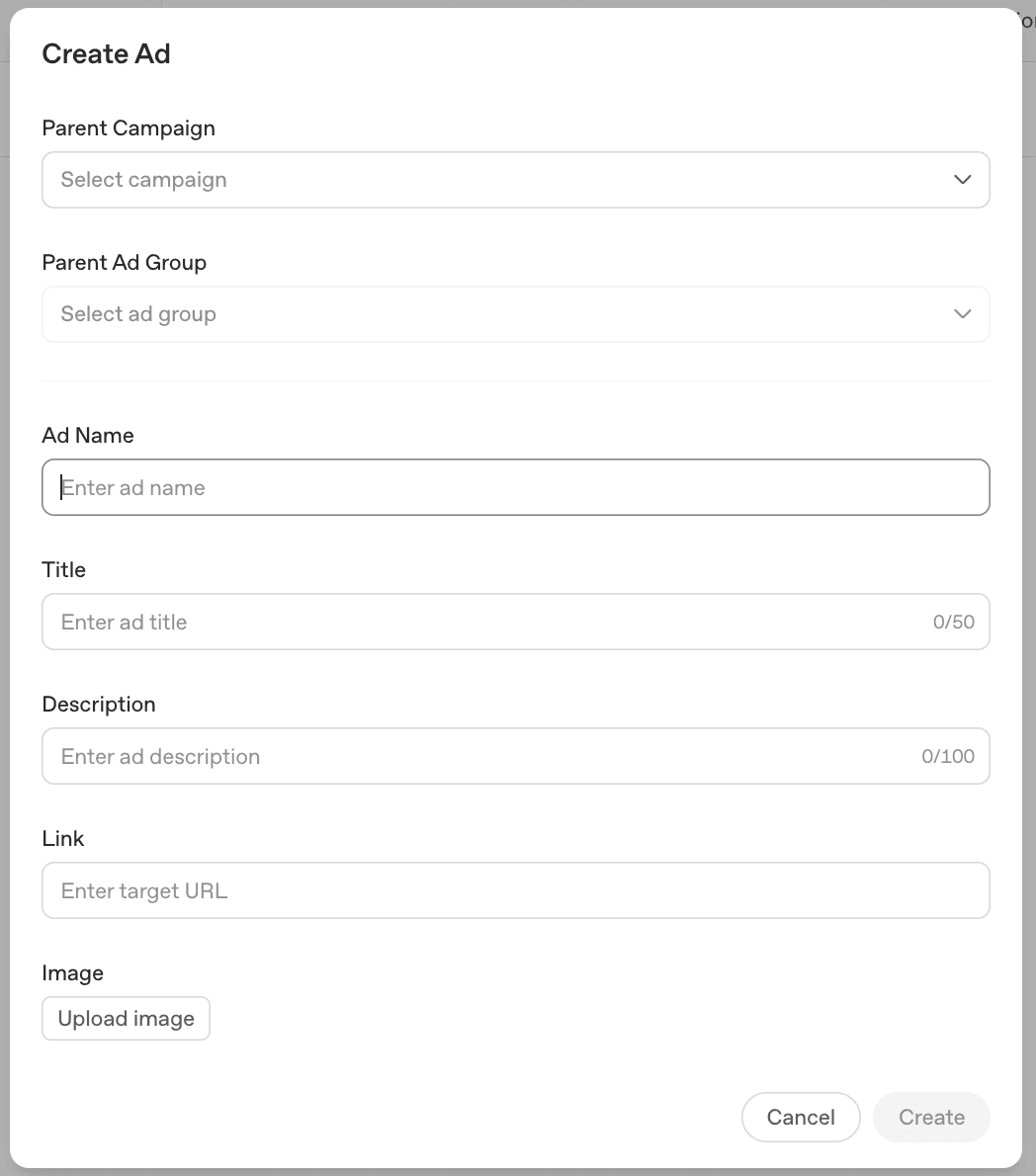
The ad is the smallest unit in the hierarchy, and — as covered in our complete guide — also the most constrained. Every ad requires the same six fields: advertiser name, logo/favicon, title, description copy, a square image, and a landing page URL. OpenAI's help documentation gives specific guidance for each.
Titles: informative over promotional
Keep titles concise and prioritize clear, useful details over broad marketing language. "Automated demo video creation" tells a reader something concrete in the space available. "The future of marketing" does not. The platform's hard limit is 50 characters, but the strongest titles tend to land closer to 20–30 characters — short enough to scan instantly, with no room left over for a tagline that requires the description to explain what it means.
Description: state the value, then add specificity if space allows
The description should make it immediately clear what the product offers or why it's useful, and — within the available space — add detail on the specific benefit, feature, or use case where possible. The hard limit is 100 characters, rendered as one or two short lines, but aiming for roughly 40–60 characters usually reads best. "Demo videos in minutes" plus "From product brief to video" is a more complete picture than either line trying to do both jobs, without running up against the cap.
Images: simple, relevant, and aligned with the copy
OpenAI's guidance is direct: use clear visuals that support the message, avoid overly abstract or cluttered visuals, and make sure the image aligns with the title and copy so the creative feels cohesive. A square 1200×1200px crop of a busy product screenshot will read as noise at the size this card renders. A single clear visual element — a product icon, a simple illustration, a focused UI element — holds up much better.
Landing pages: specific destinations, not the homepage
This is the guidance most worth internalizing: link to the most relevant destination — a product page, a collection, or a content page — rather than defaulting to a generic homepage. The ad appeared because a conversation matched a specific context hint; the landing page should continue that thread, not ask the visitor to re-orient on a homepage that talks about everything.
OpenAI also requires that landing pages be valid, reachable, and not block OpenAI's user agents — worth a quick check with your engineering team if your site has any bot-blocking or crawler restrictions in place, since a blocked landing page can affect ad delivery.
Finally, every ad — creative, image, and landing page — must comply with OpenAI's Ads Policies. Review these before finalizing creative, particularly for any claims-based copy (performance numbers, comparisons, guarantees), which tend to draw the most scrutiny on any ad platform.
Conversion tracking: Pixel and Conversions API
Two pieces of measurement infrastructure are worth setting up before you launch, not after: the OpenAI Pixel and the Conversions API, both of which became available in mid-2026. The pixel tracks post-click conversions on your site, letting you measure cost per action rather than just cost per click.
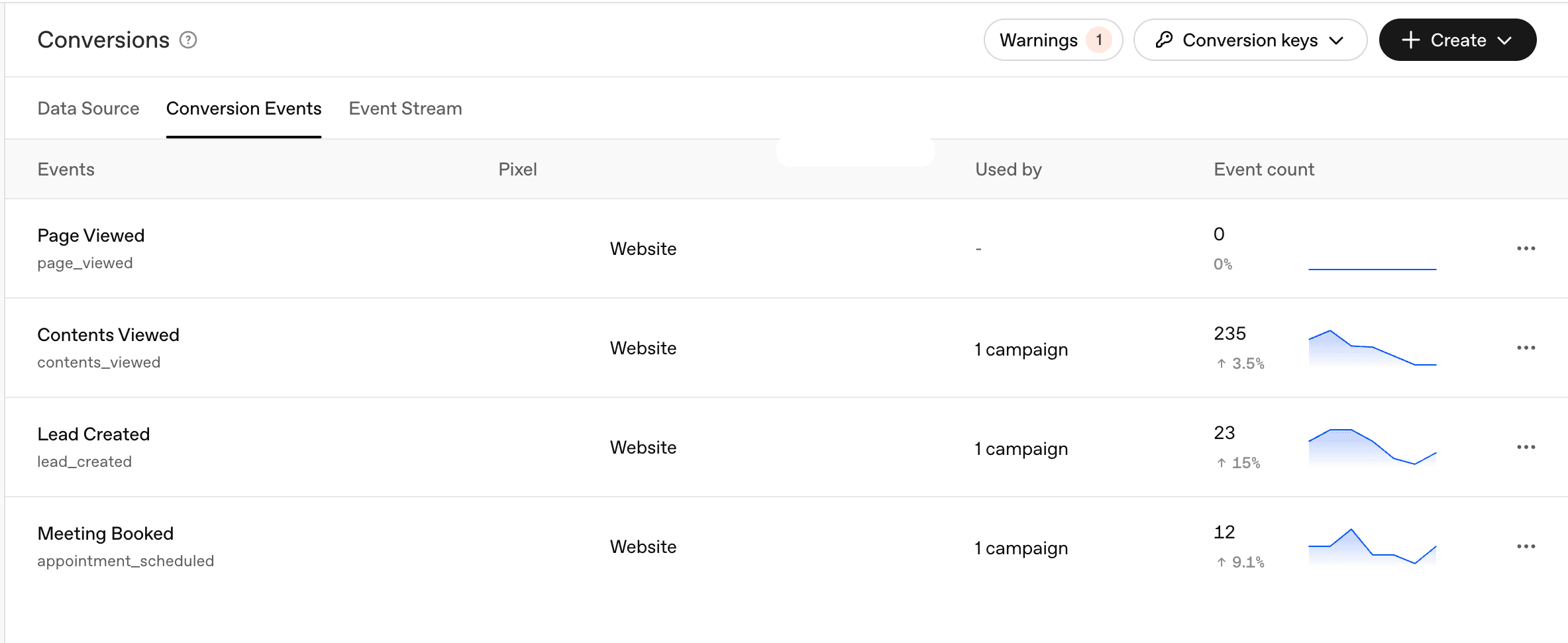
For a B2B SaaS team, this typically means firing a conversion event on whatever your landing page's primary action is — a demo request, a signup, a trial start. Even if your campaign objective is Clicks rather than Conversions (which remains "coming soon" as a campaign objective), having the pixel in place from day one means you'll have a clean dataset the moment conversion-based optimization becomes available — and in the meantime, it gives you the only reliable way to compare ChatGPT Ads performance against your other paid channels on an apples-to-apples basis.
A sample structure for a B2B SaaS launch
Putting the hierarchy together, here's what a first campaign might look like for a B2B SaaS company testing ChatGPT Ads for the first time:
Campaign: "ChatGPT Ads — Q3 Test"
- Objective: Clicks (CPC)
- Budget: Daily budget, sized to generate a meaningful number of clicks per week
- Bid: Starting at $4 CPC (within OpenAI's $3–$5 recommended range)
- Geography: US
Ad Group 1: "ICP Persona — [Persona Name] Conversations"
- 5–10 context hints describing this persona's day-to-day questions and pain points
- Audience: customer list uploaded for exclusion
- 2 ads testing different titles/images against the same landing page (a use-case page for this persona)
Ad Group 2: "Competitive Evaluation — [Category] Conversations"
- 5–10 context hints describing conversations where someone is comparing tools in your category, including competitor names
- Same exclusion list
- 2 ads pointing to a comparison or category-overview landing page
Ad Group 3: "Use Case — [Specific Workflow] Across Industries"
- 5–10 context hints describing the specific job your product does, across the industries you sell into
- 2 ads pointing to a use-case-specific landing page
This structure gives you three independent signals — persona-driven, competitive-evaluation-driven, and use-case-driven — from a single campaign, each with its own context hints, creative, and landing page. After a few weeks of data, you'll know which type of conversation is producing the most relevant traffic, and can reallocate budget toward the ad groups (and context hint styles) that work.
Common setup mistakes
Mixing personas or use cases inside one ad group. This is the single highest-leverage mistake to avoid. One ad group, one intent — full stop. If your context hints describe two different kinds of conversations, split them into two ad groups.
Sending every ad to the homepage. The homepage is the least specific destination you have. Every ad group should map to a landing page that continues the conversation its context hints describe.
Setting CPC bids far outside the $3–$5 range without a reason. Bidding far below the recommended range may mean your ad rarely wins the auction even with strong relevance; bidding far above it without evidence of stronger-than-average performance just burns budget faster without more signal.
Skipping the pixel. Even in a Clicks campaign, set up conversion tracking from day one. Without it, you'll have no way to compare this channel's actual business outcomes against the rest of your paid stack — and no historical data once Conversions becomes available as an objective.
Treating the campaign budget type as a minor setting. Since you can't switch between daily and lifetime budgets later, pick deliberately: daily for an always-on test, lifetime for a time-bound push.
The takeaway
ChatGPT's Ads Manager structure — Campaign, Ad Group, Ad — will feel familiar to anyone who has run Meta or X campaigns, and the settings at each level are mostly what you'd expect: objective and budget at the campaign level, targeting and context hints at the ad group level, and tightly-constrained creative at the ad level.
The decisions that matter most for a first launch are: pick Clicks (CPC) as your objective, start near the $3–$5 recommended bid range, keep each ad group focused on one persona or use case with 5–10 context hints, send each ad group to a landing page that matches its context hints (not your homepage), and get the conversion pixel installed before you spend a dollar.
Once your ad groups are pointing traffic at use-case-specific landing pages, the next gap for most B2B SaaS teams is having a demo ready that backs up what the ad promised. Rimo turns a product brief into a polished demo video without a production team — useful for building out the use-case pages this kind of campaign structure depends on.
FAQ
What are the three levels of structure in ChatGPT Ads?
ChatGPT's Ads Manager uses a three-level hierarchy: Campaign (objective, budget, schedule, and country-level targeting), Ad Group (Context Hints, audience targeting, and more granular geographic/device adjustments), and Ad (the actual creative — advertiser name, logo, title, description, image, and landing page). This mirrors the structure used by Meta Ads Manager and X Ads.
What campaign objectives are available in ChatGPT Ads?
At launch, two objectives are available: Reach, which buys on a CPM (cost-per-thousand-impressions) basis for awareness goals, and Clicks, which buys on a CPC (cost-per-click) basis for traffic goals. A third objective, Conversions, is listed as "coming soon" and will build on the Pixel and Conversions API infrastructure released in mid-2026.
What should my starting bid be for a ChatGPT Ads campaign?
For Reach (CPM) campaigns, the platform default maximum bid is $60 CPM. For Clicks (CPC) campaigns, OpenAI recommends a starting maximum bid of $3 to $5 per click. Delivery runs through a relevance-weighted, second-price auction, so a highly relevant ad with Context Hints that closely match real conversations can out-deliver a less relevant ad with a higher bid.
How many Context Hints should I add to an ad group?
OpenAI's guidance is roughly 5 to 10 context hints per ad group, all tightly clustered around a single intent, persona, or use case. If you want to target a different persona or use case, create a separate ad group rather than mixing intents — this keeps your targeting, creative, and performance data cleanly separated.
Can I change my campaign budget type after launch?
You can change the budget amount at any time, but you cannot switch between a daily budget and a campaign (lifetime) budget after the campaign is created. Choose a daily budget for an always-on test and a lifetime budget for a time-bound push tied to specific start and end dates.
Do I need conversion tracking if my campaign objective is Clicks, not Conversions?
Yes. Installing the OpenAI Pixel (and optionally the Conversions API) from day one lets you measure post-click outcomes — demo requests, signups, trial starts — even while your campaign objective is Clicks. This gives you a clean historical dataset for when Conversions becomes available as a campaign objective, and it's the only reliable way to compare ChatGPT Ads performance against your other paid channels.
Tags: ChatGPT Ads · OpenAI Advertising · Campaign Setup · Ad Groups · Context Hints · B2B SaaS
Akshay Sharma
Product Leader · 10+ years in B2B SaaS
Akshay has spent 10+ years building and marketing B2B SaaS products. He writes about product storytelling, demo production, and the operational side of product marketing.